Oppdaterer


iPhone Screenshots


Beskrivelse
This application enables you to see where the Quasi-Zenith Satellite System in the sky!
●What is QZSS?
Quasi-Zenith Satellite System (QZSS) is a Japanese satellite positioning system composed mainly of satellites in quasi-zenith orbits (QZO).
Satellite positioning systems use satellite signals to calculate position information. One famous example is the American Global Positioning System (GPS) and the QZSS is sometimes called the Japanese GPS.
For details, please refer to the following Website "Quasi-Zenith Satellite System".
URL : https://qzss.go.jp/en
●What is GNSS View?
GNSS View provides that iOS version application that is based on the website application "GNSS View".
This application enables you to know position of positioning satellites such as QZSS and GPS in the specified time and location.
The positioning satellites displayed in the GNSS View are not based on the satellite information directly received by the smartphone but are displayed based on the satellite arrangement calculated based on the publicly released orbit information.
●GNSS View 3 functions
【Main】
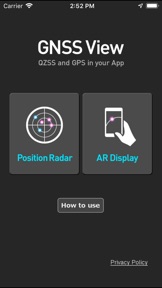
・You can move to the Position Radar screen or AR Display screen from the application startup screen.
・You can see the operating manual and privacy policy of this application via the website.
【Position Radar】
・It is provided radar view of positioning satellites such as QZSS and GPS as a sky plot at the specified time and location.
・Positioning satellites can be specified from QZSS, GPS, GLONASS, BeiDou, Galileo, SBAS.
・You can also select specified signal satellites to see on the radar.
・You can see selected satellites by setting elevation mask angle.
・You can switch east and west of satellite arrangement, turn on / off rotation, and switch on / off display of satellite number.
・It displays HDOP, VDOP, the total number of satellites and the number of each positioning satellites in the satellite arrangement displayed on the radar.
【AR Display】
・Position of positioning satellites such as QZSS and GPS on the sky from your current location is able to see through your camera at the specified time.
・In order to display satellites, it is necessary to turn on the position information of the smartphone and complete the positioning. Therefore, it may take time to display.
・Positioning satellites can be specified from QZSS, GPS, GLONASS, BeiDou, Galileo, SBAS.
・You can also select specified signal satellites to see on the radar.
・You can see selected satellites by setting elevation mask angle.
●Supported versions
・iOS 17
・iOS 16
・iOS 15
・iOS 14
・iOS 13
・iOS 12
Hva er nytt i denne versjon? (5.0.2)
Now support iOS 17.
Informasjon
Utvikler
Kategorier
Versjon
5.0.2
Størrelse
4,5 MB
Game Center
Nei
VPP Device Licensing
Ja
Vurdering
Aldersgrense: 4+
Kompatibilitet
iOS 12.0 eller senere
Enheter
iPhone 5s, iPhone 6, iPhone 6 Plus, iPhone 6s, iPhone 6s Plus, iPhone SE, iPhone 7, iPhone 7 Plus, iPhone 8, iPhone 8 Plus, iPhone X, iPhone XR, iPhone XS, iPhone XS Max, iPhone 11, iPhone 11 Pro, iPhone 11 Pro Max, iPhone SE (2. generasjon), iPhone 12, iPhone 12 Pro, iPhone 12 Pro Max, iPhone 12 mini, iPhone 13, iPhone 13 Pro, iPhone 13 Pro Max, iPhone 13 mini, iPhone SE (3. generasjon), iPhone 14, iPhone 14 Plus, iPhone 14 Pro, iPhone 14 Pro Max, iPhone 15, iPhone 15 Plus, iPhone 15 Pro, iPhone 15 Pro Max, iPad (femte generasjon) Wi-Fi, iPad (femte generasjon) Wi-Fi + Cellular, iPad (6. generasjon) Wi-Fi, iPad (6. generasjon) Wi-Fi + Cellular, iPad Pro, iPad Pro (Cellular), iPad Pro (9,7-tommers), iPad Pro (9,7-tommers) (Cellular), 12,9-tommers iPad Pro (2. generasjon), 12,9-tommers iPad Pro (2. generasjon) Wi-Fi + Cellular, iPad Pro (10,5-tommer), iPad Pro (10,5-tommer) Wi-Fi + Cellular, iPad Pro (11-tommer), iPad Pro (11-tommer) Wi-Fi + Cellular, 12,9-tommers iPad Pro (3. generasjon), 12,9-tommers iPad Pro (3. generasjon) Wi-Fi + Cellular, iPad Air, iPad Air (Cellular), iPad Air 2, iPad Air 2 (Cellular), iPad Air (tredje generasjon), iPad Air (tredje generasjon) Wi-Fi + Cellular, iPad mini Retina, iPad mini Retina (Cellular), iPad mini 3, iPad mini 3 (Cellular), iPad mini 4, iPad mini 4 (Cellular), iPad mini (femte generasjon), iPad mini (femte generasjon) Wi-Fi + Cellular, iPad (7. generasjon) Wi-Fi + Cellular, iPad Pro (11-tommers, 2. generasjon), iPad Pro (11-tommers, 2. generasjon) Wi-Fi + Cellular, iPad Pro (12,9-tommers, 4. generasjon), iPad Pro (12,9-tommers, 4. generasjon) Wi-Fi + Cellular, iPad Air (fjerde generasjon) (Wi-Fi), iPad Air (fjerde generasjon) (Wi-Fi + Cellular), iPad (8. generasjon) Wi-Fi, iPad (8. generasjon) Wi-Fi + Cellular, iPad Pro (11-tommers, 3. generasjon), iPad Pro (11-tommers, 3. generasjon) Wi-Fi + Cellular, iPad Pro (12,9-tommers, femte generasjon), iPad Pro (12,9-tommers, femte generasjon) Wi-Fi + Cellular, iPad (9. generasjon), iPad (9. generasjon) Wi-Fi + Cellular, iPad mini (6. generasjon), iPad mini (6. generasjon) Wi-Fi + Cellular, iPad Air (5. generasjon), iPad Air (5. generasjon) Wi-Fi + Cellular, iPad Pro (11-tommers, 4. generasjon), iPad Pro (11-tommers, 4. generasjon) Wi-Fi + Cellular, 12,9-tommers iPad Pro (6. generasjon), 12,9-tommers iPad Pro (6. generasjon) Wi-Fi + Cellular, iPad (10. generasjon), iPad (10. generasjon) Wi-Fi + Cellular, iPod touch (sjette generasjon), iPod touch (7. generasjon)
Språk
engelsk
App Store: Poeng
Vurderinger og omtaler
0,0 av 5 (Ingen vurdering)
App Store: Omtaler
Ingen oppføring