Om ossBetingelserPersonvernKontakt
 
Oppdaterer
instax SHARE

instax SHARE

Utgivelsesdato: 2014-01-06
© FUJIFILM Corporation
instax SHARE - QR Code
Versjon 3.4.6
4+
Last ned fra App Store
Versjon 3.4.6
4+
Last ned fra App Store
Utgivelsesdato: 2014-01-06
© FUJIFILM Corporation

iPhone Screenshots

Skjermbilde
Skjermbilde
Skjermbilde
Skjermbilde

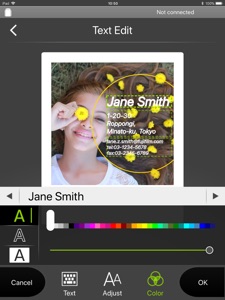
iPad Screenshots

Skjermbilde
Skjermbilde
Skjermbilde
Skjermbilde

Beskrivelse

The "instax SHARE" is FUJIFILM official application that can be used to print images from smartphones to instax SHARE smartphone printer.
[Select Your Best Shot!]
"instax SHARE" is an app to print images from your smartphone with the smartphone printer instax SHARE SP-1/SP-2/SP-3(FUJIFILM). You can enjoy beautiful instax print by simply selecting best shots in your smartphone or tablet within less than a minute.
[Supported Printer]
FUJIFILM instax SHARE Smartphone Printer SP-1/SP-2/SP-3
* Not support to old model printers.
[Caution]
(1)iCloud
If you want to print a picture stored in iCloud, save it to your device first and then print it.
(2) Permissions setting of "instax SHARE" application.
Some or all of the functions can not be used unless you enable the following permissions of "instax SHARE" application.
Please enable the authority by referring to the following procedure.
After installation, you will be asked for permission when using the following functions for the first time, please enable it.
The "Take a picture" function need the "Camera" permission.
The "Real time template" function need the "Camera" permission and the "Location" permission.
"Selection from Photos" function need the "Photos" permission.
If the authority is set to invalid, please enable it with the following operation.
--Example of operation on iPhone 6s (iOS 10.3.3)--
1.Tap "Settings"
2.Tap "instax SHARE"
3."ALLOW INSTAX SHARE TO ACCESS"
Please enable all of "Camera" "Photo" "Location".
Note: If you have not used the following functions ,these permission settings wil not be displayed.
The "Camera" permission has required by the "Take a picture" function and the "Real time template" function.
"Location" permission has required by the "Real time template" function.
The "Photos" permission has required by the "Selection from Photos" function.
[How to print]
Print photos taken with smartphones.
1. Turn on the printer.
2. **Important** By "Settings" app on your smartphone device, Choose "Wi-Fi", turn on the Wi-Fi, and choose and connect the printer SSID (INSTAX-xxxxxxxx, wrote at printer bottom) from the "CHOOSE A NETWORK..." list. (Excute once, will be connected automatically from the next time.)
3. Launch the instax SHARE app.
4. Select image from Photos or SNS, or take photo with a smartphone camera.
5. Once image is selected, press Edit and edit the image (scaling, rotate, filter and template).
6. Post message on a template if template which accepts text is selected.
7. Press "Connect and print." when editting is completed.
8. When you print for the first time, will be asked password for the printer, please enter initial password that is wrote in User's Guide of the printer.
[When you can not update in AppStore]
Phenomenon:
On the AppStore update screen, the instaxSHARE application is displayed in "Available Updates"
However ,Sometimes "Update button" has been changed to "open button",and con not be updated.
Workaround:
Please uninstall the instaxSHARE application and reinstall it.
(When reinstalling, "Reprint image" saved in the application will be cleared.)

Hva er nytt i denne versjon? (3.4.6)

Fixed minor bugs.

Selger

Navn

FUJIFILM Corporation

URL

Informasjon

Kategorier

Versjon

3.4.6

Størrelse

63 MB

Game Center

Nei

VPP Device Licensing

Ja

Vurdering

Aldersgrense: 4+

Kompatibilitet

iOS 11.0 eller senere

Enheter

iPhone 5s, iPhone 6, iPhone 6 Plus, iPhone 6s, iPhone 6s Plus, iPhone SE, iPhone 7, iPhone 7 Plus, iPhone 8, iPhone 8 Plus, iPhone X, iPhone XR, iPhone XS, iPhone XS Max, iPhone 11, iPhone 11 Pro, iPhone 11 Pro Max, iPhone SE (2. generasjon), iPhone 12, iPhone 12 Pro, iPhone 12 Pro Max, iPhone 12 mini, iPhone 13, iPhone 13 Pro, iPhone 13 Pro Max, iPhone 13 mini, iPhone SE (3. generasjon), iPhone 14, iPhone 14 Plus, iPhone 14 Pro, iPhone 14 Pro Max, iPhone 15, iPhone 15 Plus, iPhone 15 Pro, iPhone 15 Pro Max, iPhone 16, iPhone 16 Plus, iPhone 16 Pro, iPhone 16 Pro Max, iPhone 16e, iPhone 17, iPhone 17 Pro, iPhone 17 Pro Max, iPhone Air, iPhone 17e, iPad (femte generasjon) Wi-Fi, iPad (femte generasjon) Wi-Fi + Cellular, iPad (6. generasjon) Wi-Fi, iPad (6. generasjon) Wi-Fi + Cellular, iPad Pro, iPad Pro (Cellular), iPad Pro (9,7-tommers), iPad Pro (9,7-tommers) (Cellular), 12,9-tommers iPad Pro (2. generasjon), 12,9-tommers iPad Pro (2. generasjon) Wi-Fi + Cellular, iPad Pro (10,5-tommer), iPad Pro (10,5-tommer) Wi-Fi + Cellular, iPad Pro (11-tommer), iPad Pro (11-tommer) Wi-Fi + Cellular, 12,9-tommers iPad Pro (3. generasjon), 12,9-tommers iPad Pro (3. generasjon) Wi-Fi + Cellular, iPad Air, iPad Air (Cellular), iPad Air 2, iPad Air 2 (Cellular), iPad Air (tredje generasjon), iPad Air (tredje generasjon) Wi-Fi + Cellular, iPad mini Retina, iPad mini Retina (Cellular), iPad mini 3, iPad mini 3 (Cellular), iPad mini 4, iPad mini 4 (Cellular), iPad mini (femte generasjon), iPad mini (femte generasjon) Wi-Fi + Cellular, iPad (7. generasjon) Wi-Fi + Cellular, iPad Pro (11-tommers, 2. generasjon), iPad Pro (11-tommers, 2. generasjon) Wi-Fi + Cellular, iPad Pro (12,9-tommers, 4. generasjon), iPad Pro (12,9-tommers, 4. generasjon) Wi-Fi + Cellular, iPad Air (fjerde generasjon) (Wi-Fi), iPad Air (fjerde generasjon) (Wi-Fi + Cellular), iPad (8. generasjon) Wi-Fi, iPad (8. generasjon) Wi-Fi + Cellular, iPad Pro (11-tommers, 3. generasjon), iPad Pro (11-tommers, 3. generasjon) Wi-Fi + Cellular, iPad Pro (12,9-tommers, femte generasjon), iPad Pro (12,9-tommers, femte generasjon) Wi-Fi + Cellular, iPad (9. generasjon), iPad (9. generasjon) Wi-Fi + Cellular, iPad mini (6. generasjon), iPad mini (6. generasjon) Wi-Fi + Cellular, iPad Air (5. generasjon), iPad Air (5. generasjon) Wi-Fi + Cellular, iPad Pro (11-tommers, 4. generasjon), iPad Pro (11-tommers, 4. generasjon) Wi-Fi + Cellular, 12,9-tommers iPad Pro (6. generasjon), 12,9-tommers iPad Pro (6. generasjon) Wi-Fi + Cellular, iPad (10. generasjon), iPad (10. generasjon) Wi-Fi + Cellular, 11-tommers iPad Air (M2) Wi-Fi, 13-tommers iPad Air (M2) Wi-Fi, 13-tommers iPad Air (M2) Wi-Fi + Cellular, 11-tommers iPad Pro (M4) Wi-Fi, 11-tommers iPad Pro (M4) Wi-Fi + Cellular, 13-tommers iPad Pro (M4) Wi-Fi, 13-tommers iPad Pro (M4) Wi-Fi + Cellular, iPad mini (A17 Pro) Wi-Fi, iPad mini (A17 Pro) Wi-Fi + Cellular, iPad (A16) Wi-Fi, iPad (A16) Wi-Fi + Cellular, 11-tommers iPad Air (M3) Wi-Fi, 11-tommers iPad Air (M3) Wi-Fi + Cellular, 13-tommers iPad Air (M3) Wi-Fi, 13-tommers iPad Air (M3) Wi-Fi + Cellular, 11-tommers iPad Pro (M5) Wi-Fi, 11-tommers iPad Pro (M5) Wi-Fi + Cellular, 13-tommers iPad Pro (M5) Wi-Fi, 13-tommers iPad Pro (M5) Wi-Fi + Cellular, iPad Air11M4, iPad Air11M4Cellular, iPad Air13M4, iPad Air13M4Cellular, iPod touch (sjette generasjon), iPod touch (7. generasjon)

Språk

engelsk, fransk, japansk, kinesisk, koreansk, polsk, portugisisk, spansk, tsjekkisk, tysk

App Store: Poeng

Vurderinger og omtaler

3,0 av 5 (11 Vurderinger)

App Store: Omtaler

2021-04-30

Pretty bad app

This app pretty bad, and the worst if that you’re stuck with it if you have one of Fuji’s printers. Fuji should be ashamed to publish such a bad app in 2021. The interface looks like something from 10 years ago, the app asks me to connect to internet while I am supposed to be connected to the printer’s wifi at the same time, you can pick pictures from your phone but the app does not let you select albums on your phone (e.g favorites). The app has a black line at the top and bottom although Apple has changed their screen size many years ago, what are you doing Fuji? Seriously!
valentinvdb
Versjon 3.4.5
2020-12-20

Outdated

Is it so difficult to release update for new iPhones? The app looks really outdated!
Durix007
Versjon 3.4.3
2020-09-05

Language ??

Can I change the language? It is on French and I want it in English
language??
Versjon 3.4.3
2020-07-20

Wont connect

Won't connect after the latest update for iphone
mouse1nk
Versjon 3.4.3
2019-10-03

Broken

App was working okay, little bit clunky perhaps, didn’t use it for a month or two. Now when I try to use it again it cannot connect to the printer (though the phone is connected to the printer’s WiFi) . Don’t know if this is related to latest iOS update or if Fujifilm are deliberately turning their products into bricks (there is literally no other way to use them) to force you to buy their new Instax Mini Link printer. Furious, Fuji need to seriously put some work into their app development.
Stugwash
Versjon 3.4.1
2019-10-02

Please give us a new update

I love this printer and this app, but please give an update. My printer won’t work with the new update for iPhone. I can’t connect, it worked perfectly before the update.
Help! 👀
MiriamLunde
Versjon 3.4.1