Oppdaterer


iPhone Screenshots



iPad Screenshots


Beskrivelse
Say goodbye to slow data entry and hello to turbocharged efficiency with Notion Entry: the fastest way to add database entries to Notion!
Why you’ll love using Notion Entry:
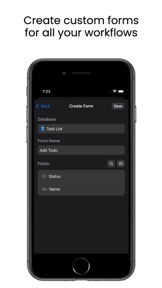
– Custom Entry Forms for Your Unique Workflows –
Unleash your productivity with customizable entry forms! Choose a subset or all properties from your database and mix and match to create personalized entry forms. Whether you're logging expenses, tracking habits, or adding Todos, Notion Entry adapts to your every workflow need!
– Offline Mode –
Don't let a little thing like being offline slow you down. With Notion Entry, you can keep adding entries, even without an internet connection. Once you're back online, we'll sync everything seamlessly back to Notion!
– Widgets for On-the-Go –
Notion Entry offers convenient widgets for your home and lock screens that let you add entries instantly as you go about your day. Tap on a form widget, and start adding entries like a pro!
– Comprehensive Support for Database Property Types –
Text, numbers, statuses, selects, multi-selects, dates, emails, phones, checkboxes...Notion Entry supports the majority of property types you need to populate your notion databases.
– Secure and Private Data Storage –
Notion Entry saves and syncs your database entries exclusively on your device, without storing any information on our servers.
Simple and easy to set up:
1. Connect Your Notion Workspace:
Link your Notion account effortlessly within the app, allowing you to connect your databases seamlessly.
2. Select a Database:
Choose from your existing databases or create a new one.
3. Customize Your Epic Entry Form:
Pick and choose the database properties best suited for the workflow
4. Add Entries Like a Champ:
Once your entry form is set up, it's time to start adding entries. Just enter the info and let Notion Entry seamlessly populate your database.
Notion Entry is free to use with pro features that can be activated via in-app purchases. Current pricing and purchase offers are available in the app.
By downloading and using Notion Entry you agree to our terms and conditions:
Terms of Use https://notionentry.com/legal/terms
Privacy policy https://notionentry.com/legal/terms
Hva er nytt i denne versjon? (1.9)
- Support for dark and tinted app icons.
- Date fields in forms can now be configured as optional
- Improvements to relation properties and the share extension
- General bug fixes and improvements.
Selger
Navn
Dev Harvest LLC
Informasjon
Utvikler
Kategorier
Versjon
1.9
Størrelse
20,8 MB
Game Center
Nei
VPP Device Licensing
Ja
Vurdering
Aldersgrense: 4+
Kompatibilitet
iOS 16.0 eller senere
Enheter
iPhone 5s, iPhone 6, iPhone 6 Plus, iPhone 6s, iPhone 6s Plus, iPhone SE, iPhone 7, iPhone 7 Plus, iPhone 8, iPhone 8 Plus, iPhone X, iPhone XR, iPhone XS, iPhone XS Max, iPhone 11, iPhone 11 Pro, iPhone 11 Pro Max, iPhone SE (2. generasjon), iPhone 12, iPhone 12 Pro, iPhone 12 Pro Max, iPhone 12 mini, iPhone 13, iPhone 13 Pro, iPhone 13 Pro Max, iPhone 13 mini, iPhone SE (3. generasjon), iPhone 14, iPhone 14 Plus, iPhone 14 Pro, iPhone 14 Pro Max, iPhone 15, iPhone 15 Plus, iPhone 15 Pro, iPhone 15 Pro Max, iPhone 16, iPhone 16Plus, iPhone 16Pro, iPhone 16ProMax, iPhone 16e, iPad (femte generasjon) Wi-Fi, iPad (femte generasjon) Wi-Fi + Cellular, iPad (6. generasjon) Wi-Fi, iPad (6. generasjon) Wi-Fi + Cellular, iPad Pro, iPad Pro (Cellular), iPad Pro (9,7-tommers), iPad Pro (9,7-tommers) (Cellular), 12,9-tommers iPad Pro (2. generasjon), 12,9-tommers iPad Pro (2. generasjon) Wi-Fi + Cellular, iPad Pro (10,5-tommer), iPad Pro (10,5-tommer) Wi-Fi + Cellular, iPad Pro (11-tommer), iPad Pro (11-tommer) Wi-Fi + Cellular, 12,9-tommers iPad Pro (3. generasjon), 12,9-tommers iPad Pro (3. generasjon) Wi-Fi + Cellular, iPad Air, iPad Air (Cellular), iPad Air 2, iPad Air 2 (Cellular), iPad Air (tredje generasjon), iPad Air (tredje generasjon) Wi-Fi + Cellular, iPad mini Retina, iPad mini Retina (Cellular), iPad mini 3, iPad mini 3 (Cellular), iPad mini 4, iPad mini 4 (Cellular), iPad mini (femte generasjon), iPad mini (femte generasjon) Wi-Fi + Cellular, iPad (7. generasjon) Wi-Fi + Cellular, iPad Pro (11-tommers, 2. generasjon), iPad Pro (11-tommers, 2. generasjon) Wi-Fi + Cellular, iPad Pro (12,9-tommers, 4. generasjon), iPad Pro (12,9-tommers, 4. generasjon) Wi-Fi + Cellular, iPad Air (fjerde generasjon) (Wi-Fi), iPad Air (fjerde generasjon) (Wi-Fi + Cellular), iPad (8. generasjon) Wi-Fi, iPad (8. generasjon) Wi-Fi + Cellular, iPad Pro (11-tommers, 3. generasjon), iPad Pro (11-tommers, 3. generasjon) Wi-Fi + Cellular, iPad Pro (12,9-tommers, femte generasjon), iPad Pro (12,9-tommers, femte generasjon) Wi-Fi + Cellular, iPad (9. generasjon), iPad (9. generasjon) Wi-Fi + Cellular, iPad mini (6. generasjon), iPad mini (6. generasjon) Wi-Fi + Cellular, iPad Air (5. generasjon), iPad Air (5. generasjon) Wi-Fi + Cellular, iPad Pro (11-tommers, 4. generasjon), iPad Pro (11-tommers, 4. generasjon) Wi-Fi + Cellular, 12,9-tommers iPad Pro (6. generasjon), 12,9-tommers iPad Pro (6. generasjon) Wi-Fi + Cellular, iPad (10. generasjon), iPad (10. generasjon) Wi-Fi + Cellular, 11-tommers iPad Air (M2) Wi-Fi, 13-tommers iPad Air (M2) Wi-Fi, 13-tommers iPad Air (M2) Wi-Fi + Cellular, 11-tommers iPad Pro (M4) Wi-Fi, 11-tommers iPad Pro (M4) Wi-Fi + Cellular, 13-tommers iPad Pro (M4) Wi-Fi, 13-tommers iPad Pro (M4) Wi-Fi + Cellular, iPad A16, iPad A16Cellular, iPad Air11M3, iPad Air11M3Cellular, iPad Air13M3, iPad Air13M3Cellular, iPad MiniA17Pro, iPad MiniA17ProCellular, iPod touch (sjette generasjon), iPod touch (7. generasjon)
Språk
engelsk
App Store: Poeng
Vurderinger og omtaler
5,0 av 5 (1 Vurdering)
App Store: Omtaler
Ingen oppføring