Oppdaterer


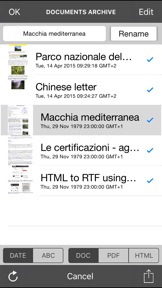
iPhone Screenshots



iPad Screenshots



Beskrivelse
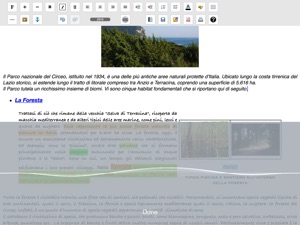
iWord PRO is a powerful word processor ("rich text editor") that will transform your device in a professional typewriter.
iWord is designed to replace the traditional word processors for personal computers and to enhance the versatility and ease of use.
Useful for journalists, students, writers, office work, for reports, etc…
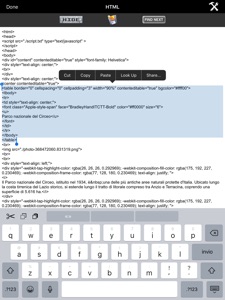
iWord is also an HTML editor: you can then use the HTML language to edit the written documents and / or to create your own web pages.
iWord can export the written documents in PDF or HTML file formats and can share them using remote storage and sharing systems (e.g. cloud).
Using the “export to HTML” you can also use iWord to create your own web pages and/or ebook.
Also, by pressing the "Speech to Text" button on the keyboard you can dictate text to be written... "Speech to Text" (using Siri) will insert for you the dictated text in the document, at the position where the cursor is displayed.
Turn your device in a typewriter that can be used sitting on the couch at home, at work or during a trip.
Features:
- "IWord" + "Speech to Text": dictate the text to be written and "Speech to Text" will write automatically for You the dictated text in the document
- "Text To Speech" to read the written text
- "documents models" window
- Intuitive interface: start the program and in a few seconds you are already writing
- HTML EDITOR
- Automatic Indentation
- Automatic formatting lists
- Versatile structure to create any type of document
- Tables with or without borders
- Ability to color the table cells (infinite numbers of colors)
- Text Highlighting (infinite numbers of colors)
- Ability to color the text (infinite numbers of colors)
- Indentation of the text: left, center, right, justified
- Many fonts available (all fonts supported by the device)
- Bold, Italic, Underline
- Adjustable font size
- Ability to insert multiple images
- Load images from the photo album of the device with the ability to scale the imported images
- Inserting images in the table or in any position of the document, etc.
- Page separator
- Abilty to Insert web links
- Undo and redo
- Export, share the written document using PDF and HTML formats (write Your own web pages using iWord) and send it via email
- Sharing files between iPad and iPhone
- Remote sharing of documents with friends: share your written documents with colleagues or friends far away from You
- Compress (zip) and automatic extraction during import (unzip) of the documents (for the remote sharing or to send the written documents with an email)
- Characters counter
- PDF preview
- Retina resolution
Management for the documents stored in the "iWord Archive":
- Archiving and document management: save, read, edit, duplicate, delete, archive, share, etc.. an infinite number of documents
- Import documents via file sharing, copy/paste, Open In, email attachments, etc.
COPY / PASTE:
- Select and copy web pages (or parts of them) and paste into iWord
Import RTF, TXT, MS Office and iWork documents:
Using "Open In" and/or “iFolders Safe” and the copy/paste feature of iWord PRO You can import the RTF, MS Office and iWork documents or parts of the documents in the iWord PRO rich text area, modify and save them or export them in the HTML file format
Sharing documents (IN/OUT) with:
- Dropbox (remote storage systems, cloud), iCloud Drive
- Open In
- iTunes File Sharing
- email attachment
Display:
- Retina display supported
"Speech to Text":
- Write speaking, without using the keyboard
"Text To Speech":
- Read the written text
Supported device orientations:
- Portrait and Landscape (iPad)
Print:
- AirPrint
App type:
- UNIVERSAL APP (you pay only once and runs on all the devices)
E-book compatible:
- "iWord PRO html doc" to "e-book" is very simple using "calibre"
Hva er nytt i denne versjon? (2.1)
New development/support:
- the iWord PRO project restarts with this new version optimized for the new iOS and for all compatible iPhone and iPad models
- created new support on Facebook for end users (new Facebook page: “Gianluca Natalini”):
> any of your requests (by email or on Messenger) will be implemented and added to iWord PRO as soon as possible with a free update
> replies to your messages (in 24 hours), to your questions, clarifications, help…
App improvements:
Improved writing and user experience in this new version of iWord PRO, on every type of iPhone and iPad:
- new keyboards and more fonts
- more workspace area to write text now also on iPhone and iPad
- app interfaces redesigned and optimized for each screen/resolution, so you can use every available pixel of your iPhone and iPad screens
- revised all the source code and optimized for the new iOS
- improved app performances
- better HTML editor to modify the document using HTML language and to create your web pages
- minor bugs fixed
App documentation:
- New documentation (soon also available on Amazon) and video tutorials now available at URL: http://www.ngcybit.it/iTunesApp/iword/iword-quick-users-guide.html
Selger
Navn
Gianluca Natalini
Informasjon
Utvikler
Kategorier
Versjon
2.1
Størrelse
6,3 MB
Game Center
Nei
VPP Device Licensing
Ja
Vurdering
Aldersgrense: 4+
Kompatibilitet
iOS 16.0 eller senere
Enheter
iPhone 5s, iPhone 6, iPhone 6 Plus, iPhone 6s, iPhone 6s Plus, iPhone SE, iPhone 7, iPhone 7 Plus, iPhone 8, iPhone 8 Plus, iPhone X, iPhone XR, iPhone XS, iPhone XS Max, iPhone 11, iPhone 11 Pro, iPhone 11 Pro Max, iPhone SE (2. generasjon), iPhone 12, iPhone 12 Pro, iPhone 12 Pro Max, iPhone 12 mini, iPhone 13, iPhone 13 Pro, iPhone 13 Pro Max, iPhone 13 mini, iPhone SE (3. generasjon), iPhone 14, iPhone 14 Plus, iPhone 14 Pro, iPhone 14 Pro Max, iPhone 15, iPhone 15 Plus, iPhone 15 Pro, iPhone 15 Pro Max, iPhone 16, iPhone 16Plus, iPhone 16Pro, iPhone 16ProMax, iPad (femte generasjon) Wi-Fi, iPad (femte generasjon) Wi-Fi + Cellular, iPad (6. generasjon) Wi-Fi, iPad (6. generasjon) Wi-Fi + Cellular, iPad Pro, iPad Pro (Cellular), iPad Pro (9,7-tommers), iPad Pro (9,7-tommers) (Cellular), 12,9-tommers iPad Pro (2. generasjon), 12,9-tommers iPad Pro (2. generasjon) Wi-Fi + Cellular, iPad Pro (10,5-tommer), iPad Pro (10,5-tommer) Wi-Fi + Cellular, iPad Pro (11-tommer), iPad Pro (11-tommer) Wi-Fi + Cellular, 12,9-tommers iPad Pro (3. generasjon), 12,9-tommers iPad Pro (3. generasjon) Wi-Fi + Cellular, iPad Air, iPad Air (Cellular), iPad Air 2, iPad Air 2 (Cellular), iPad Air (tredje generasjon), iPad Air (tredje generasjon) Wi-Fi + Cellular, iPad mini Retina, iPad mini Retina (Cellular), iPad mini 3, iPad mini 3 (Cellular), iPad mini 4, iPad mini 4 (Cellular), iPad mini (femte generasjon), iPad mini (femte generasjon) Wi-Fi + Cellular, iPad (7. generasjon) Wi-Fi + Cellular, iPad Pro (11-tommers, 2. generasjon), iPad Pro (11-tommers, 2. generasjon) Wi-Fi + Cellular, iPad Pro (12,9-tommers, 4. generasjon), iPad Pro (12,9-tommers, 4. generasjon) Wi-Fi + Cellular, iPad Air (fjerde generasjon) (Wi-Fi), iPad Air (fjerde generasjon) (Wi-Fi + Cellular), iPad (8. generasjon) Wi-Fi, iPad (8. generasjon) Wi-Fi + Cellular, iPad Pro (11-tommers, 3. generasjon), iPad Pro (11-tommers, 3. generasjon) Wi-Fi + Cellular, iPad Pro (12,9-tommers, femte generasjon), iPad Pro (12,9-tommers, femte generasjon) Wi-Fi + Cellular, iPad (9. generasjon), iPad (9. generasjon) Wi-Fi + Cellular, iPad mini (6. generasjon), iPad mini (6. generasjon) Wi-Fi + Cellular, iPad Air (5. generasjon), iPad Air (5. generasjon) Wi-Fi + Cellular, iPad Pro (11-tommers, 4. generasjon), iPad Pro (11-tommers, 4. generasjon) Wi-Fi + Cellular, 12,9-tommers iPad Pro (6. generasjon), 12,9-tommers iPad Pro (6. generasjon) Wi-Fi + Cellular, iPad (10. generasjon), iPad (10. generasjon) Wi-Fi + Cellular, 11-tommers iPad Air (M2) Wi-Fi, 13-tommers iPad Air (M2) Wi-Fi, 13-tommers iPad Air (M2) Wi-Fi + Cellular, 11-tommers iPad Pro (M4) Wi-Fi, 11-tommers iPad Pro (M4) Wi-Fi + Cellular, 13-tommers iPad Pro (M4) Wi-Fi, 13-tommers iPad Pro (M4) Wi-Fi + Cellular, iPad MiniA17Pro, iPad MiniA17ProCellular, iPod touch (sjette generasjon), iPod touch (7. generasjon)
Språk
engelsk
App Store: Poeng
Vurderinger og omtaler
0,0 av 5 (Ingen vurdering)
App Store: Omtaler
Ingen oppføring