Om ossBetingelserPersonvernKontakt
 
Oppdaterer
SmartScan Pro: PDF scanner

SmartScan Pro: PDF scanner

Utgivelsesdato: 2012-06-13
© Amaxim Apps 2023
SmartScan Pro: PDF scanner - QR Code
Versjon 6.1.0
4+
Last ned fra App Store
Versjon 6.1.0
4+
Last ned fra App Store
Utgivelsesdato: 2012-06-13
© Amaxim Apps 2023

iPhone Screenshots

Skjermbilde
Skjermbilde
Skjermbilde
Skjermbilde
Skjermbilde
Skjermbilde
Skjermbilde

iPad Screenshots

Skjermbilde
Skjermbilde
Skjermbilde
Skjermbilde
Skjermbilde
Skjermbilde
Skjermbilde

Beskrivelse

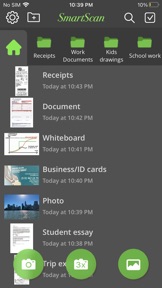
Your iPhone becomes a fully-featured, powerful document scanner with SmartScan. You can quickly and easily scan your multipage documents in high quality PDF or JPEG files on your iPhone or iPad. You can then rename and organize them, and send them anywhere.
SmartScan uses complex and efficient algorithms to accurately detect document edges, correct their perspective, eliminate shadows, and perfectly contrast text, black on white. You can also choose between color and black-and-white photo modes. Our user interface is powerful and easy to use. With this app you can easily adjust the brightness, color, and rotation of your device.
SmartScan offers SuperScan, a scanning mode that captures sharper images, especially in low-light conditions. Acquiring multiple takes of the same scan, SuperScan guarantees the best result.
SmartScan also has an "Email to myself" feature that works with a single tap.
SMARTSCAN FEATURES:
• Automatic document edge detection and shooting. Perspective correction
• SuperScan mode for sharpest scans
• Document naming, storage in folders and smart search
• “Email to myself” feature for quick routine emails
• Add and reorder pages at any time
• Arrange multiple receipts or business cards on a PDF page for printing, etc.
• Email or message documents as PDF, JPEG, or PNG, or save to Photos
• Touch ID & passcode lock
• Upload, auto-upload and backup to iCloud Drive
• Open PDFs or JPEGs in other apps like Dropbox or Google Drive to send to clouds
• Copy & paste scans to other scans or Clipboard, and merge
• AirDrop function
• Printing via AirPrint or printing apps
• Compact attachments with adjustable size
• Ultra-fast processing
Scanning tips
• Make sure the document is laying flat in a bright location
• For optimal edge detection results, make sure to have a contrasting outline or margin around your document while snapping the photo
• When shooting in low light conditions, use flash to illuminate the scene. However, be careful not to produce too much glare from shiny documents or surfaces.
SmartScan is on a road of constant improvement, and we value your input and feedback.
If you have any questions or problems with the SmartScan app, please email us at support@amaximapps.com. We would be happy to help you out.
Thank you!

Hva er nytt i denne versjon? (6.1.0)

iPhone 15 Pro issues fixed
Bug fixes

Selger

Navn

AMAXIM APPS, INC

Informasjon

Kategorier

Versjon

6.1.0

Størrelse

18,4 MB

Game Center

Nei

VPP Device Licensing

Ja

Vurdering

Aldersgrense: 4+

Kompatibilitet

iOS 12.0 eller senere

Enheter

iPhone 5s, iPhone 6, iPhone 6 Plus, iPhone 6s, iPhone 6s Plus, iPhone SE, iPhone 7, iPhone 7 Plus, iPhone 8, iPhone 8 Plus, iPhone X, iPhone XR, iPhone XS, iPhone XS Max, iPhone 11, iPhone 11 Pro, iPhone 11 Pro Max, iPhone SE (2. generasjon), iPhone 12, iPhone 12 Pro, iPhone 12 Pro Max, iPhone 12 mini, iPhone 13, iPhone 13 Pro, iPhone 13 Pro Max, iPhone 13 mini, iPhone SE (3. generasjon), iPhone 14, iPhone 14 Plus, iPhone 14 Pro, iPhone 14 Pro Max, iPhone 15, iPhone 15 Plus, iPhone 15 Pro, iPhone 15 Pro Max, iPhone 16, iPhone 16Plus, iPhone 16Pro, iPhone 16ProMax, iPad (femte generasjon) Wi-Fi, iPad (femte generasjon) Wi-Fi + Cellular, iPad (6. generasjon) Wi-Fi, iPad (6. generasjon) Wi-Fi + Cellular, iPad Pro, iPad Pro (Cellular), iPad Pro (9,7-tommers), iPad Pro (9,7-tommers) (Cellular), 12,9-tommers iPad Pro (2. generasjon), 12,9-tommers iPad Pro (2. generasjon) Wi-Fi + Cellular, iPad Pro (10,5-tommer), iPad Pro (10,5-tommer) Wi-Fi + Cellular, iPad Pro (11-tommer), iPad Pro (11-tommer) Wi-Fi + Cellular, 12,9-tommers iPad Pro (3. generasjon), 12,9-tommers iPad Pro (3. generasjon) Wi-Fi + Cellular, iPad Air, iPad Air (Cellular), iPad Air 2, iPad Air 2 (Cellular), iPad Air (tredje generasjon), iPad Air (tredje generasjon) Wi-Fi + Cellular, iPad mini Retina, iPad mini Retina (Cellular), iPad mini 3, iPad mini 3 (Cellular), iPad mini 4, iPad mini 4 (Cellular), iPad mini (femte generasjon), iPad mini (femte generasjon) Wi-Fi + Cellular, iPad (7. generasjon) Wi-Fi + Cellular, iPad Pro (11-tommers, 2. generasjon), iPad Pro (11-tommers, 2. generasjon) Wi-Fi + Cellular, iPad Pro (12,9-tommers, 4. generasjon), iPad Pro (12,9-tommers, 4. generasjon) Wi-Fi + Cellular, iPad Air (fjerde generasjon) (Wi-Fi), iPad Air (fjerde generasjon) (Wi-Fi + Cellular), iPad (8. generasjon) Wi-Fi, iPad (8. generasjon) Wi-Fi + Cellular, iPad Pro (11-tommers, 3. generasjon), iPad Pro (11-tommers, 3. generasjon) Wi-Fi + Cellular, iPad Pro (12,9-tommers, femte generasjon), iPad Pro (12,9-tommers, femte generasjon) Wi-Fi + Cellular, iPad (9. generasjon), iPad (9. generasjon) Wi-Fi + Cellular, iPad mini (6. generasjon), iPad mini (6. generasjon) Wi-Fi + Cellular, iPad Air (5. generasjon), iPad Air (5. generasjon) Wi-Fi + Cellular, iPad Pro (11-tommers, 4. generasjon), iPad Pro (11-tommers, 4. generasjon) Wi-Fi + Cellular, 12,9-tommers iPad Pro (6. generasjon), 12,9-tommers iPad Pro (6. generasjon) Wi-Fi + Cellular, iPad (10. generasjon), iPad (10. generasjon) Wi-Fi + Cellular, 11-tommers iPad Air (M2) Wi-Fi, 13-tommers iPad Air (M2) Wi-Fi, 13-tommers iPad Air (M2) Wi-Fi + Cellular, 11-tommers iPad Pro (M4) Wi-Fi, 11-tommers iPad Pro (M4) Wi-Fi + Cellular, 13-tommers iPad Pro (M4) Wi-Fi, 13-tommers iPad Pro (M4) Wi-Fi + Cellular, iPad MiniA17Pro, iPad MiniA17ProCellular, iPod touch (sjette generasjon), iPod touch (7. generasjon)

Språk

engelsk, fransk, italiensk, japansk, kinesisk, portugisisk, russisk, spansk, tysk

App Store: Poeng

Vurderinger og omtaler

4,0 av 5 (8 Vurderinger)

App Store: Omtaler

2015-06-04

Useful tool...

Very easy to use. Works fine on my iPhone 4.
If I could rename scans I would rate 5 stars..
I'm addicted too
Versjon 4.4