Oppdaterer


±0
iPhone Screenshots


iPad Screenshots


Beskrivelse
Meet Harbour - Docker/Portainer Management App for iOS!
Multiple Servers & Endpoints
Effortlessly manage multiple Docker servers and endpoints from one centralized platform. Whether it's your home server, or production environment at work, Harbour ensures seamless connectivity and control.
Manage Your Containers
Take charge of your Docker containers with ease. From managing container's states, to monitoring their status and logs, Harbour puts container management at your fingertips.
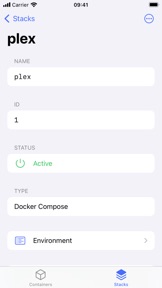
Control Your Stacks
Streamline your application deployment process by managing Docker stacks efficiently. With Harbour, you can effortlessly view, start/stop, deploy and remove stacks, ensuring smooth operation of your containerized applications.
Widgets - Containers at a Glance
Stay informed about your containers' status and performance with Harbour's intuitive widgets. Get (almost) real-time insights right on your Home Screen, keeping you updated without switching between applications.
Handoff - Continue Where You Left Off
Seamlessly transition between your iOS device and other Apple devices with Handoff support. Start your Docker management tasks on one device and effortlessly continue from where you left off on another, ensuring uninterrupted productivity.
Background Notifications
Stay informed about important events and updates even when Harbour is not actively in use. Background notifications keep you in the loop, ensuring you never miss critical alerts regarding your Docker containers.
iPadOS Support
Extend your Docker management capabilities to your iPad with full support for iPadOS. Enjoy the convenience of managing your containers and stacks on a larger screen, whether you're at your desk or on the go.
No Telemetry
Your privacy matters. Harbour is committed to respecting your privacy by ensuring that no telemetry data is collected :)
Hva er nytt i denne versjon? (4.1.1)
General
- Added the ability to navigate to the containers and stacks lists through deeplinks (harbour://containers, harbour://stacks).
- Indicators now support various states (loading, success, failure).
- Tapping on the "Containers Changed" notification will now show a dedicated overview (it also can be accessed from the toolbar menu in the containers view).
Containers
- You can now remove containers.
- Containers are now being indexed in Spotlight.
- The container network view now provides more information.
- Added container health to the details view.
- After executing a container action, container will fully refresh.
Stacks
- You can now update existing stacks.
- Stacks list cells and details menu now use the same context menus.
- Stacks are now being indexed in Spotlight.
Selger
Navn
Kacper Kaczmarzyk
Informasjon
Utvikler
Kategorier
Versjon
4.1.1
Størrelse
9,3 MB
Game Center
Nei
VPP Device Licensing
Ja
Vurdering
Aldersgrense: 4+
Kompatibilitet
iOS 17.0 eller senere
Enheter
iPhone 5s, iPhone 6, iPhone 6 Plus, iPhone 6s, iPhone 6s Plus, iPhone SE, iPhone 7, iPhone 7 Plus, iPhone 8, iPhone 8 Plus, iPhone X, iPhone XR, iPhone XS, iPhone XS Max, iPhone 11, iPhone 11 Pro, iPhone 11 Pro Max, iPhone SE (2. generasjon), iPhone 12, iPhone 12 Pro, iPhone 12 Pro Max, iPhone 12 mini, iPhone 13, iPhone 13 Pro, iPhone 13 Pro Max, iPhone 13 mini, iPhone SE (3. generasjon), iPhone 14, iPhone 14 Plus, iPhone 14 Pro, iPhone 14 Pro Max, iPhone 15, iPhone 15 Plus, iPhone 15 Pro, iPhone 15 Pro Max, iPad (femte generasjon) Wi-Fi, iPad (femte generasjon) Wi-Fi + Cellular, iPad (6. generasjon) Wi-Fi, iPad (6. generasjon) Wi-Fi + Cellular, iPad Pro, iPad Pro (Cellular), iPad Pro (9,7-tommers), iPad Pro (9,7-tommers) (Cellular), 12,9-tommers iPad Pro (2. generasjon), 12,9-tommers iPad Pro (2. generasjon) Wi-Fi + Cellular, iPad Pro (10,5-tommer), iPad Pro (10,5-tommer) Wi-Fi + Cellular, iPad Pro (11-tommer), iPad Pro (11-tommer) Wi-Fi + Cellular, 12,9-tommers iPad Pro (3. generasjon), 12,9-tommers iPad Pro (3. generasjon) Wi-Fi + Cellular, iPad Air, iPad Air (Cellular), iPad Air 2, iPad Air 2 (Cellular), iPad Air (tredje generasjon), iPad Air (tredje generasjon) Wi-Fi + Cellular, iPad mini Retina, iPad mini Retina (Cellular), iPad mini 3, iPad mini 3 (Cellular), iPad mini 4, iPad mini 4 (Cellular), iPad mini (femte generasjon), iPad mini (femte generasjon) Wi-Fi + Cellular, iPad (7. generasjon) Wi-Fi + Cellular, iPad Pro (11-tommers, 2. generasjon), iPad Pro (11-tommers, 2. generasjon) Wi-Fi + Cellular, iPad Pro (12,9-tommers, 4. generasjon), iPad Pro (12,9-tommers, 4. generasjon) Wi-Fi + Cellular, iPad Air (fjerde generasjon) (Wi-Fi), iPad Air (fjerde generasjon) (Wi-Fi + Cellular), iPad (8. generasjon) Wi-Fi, iPad (8. generasjon) Wi-Fi + Cellular, iPad Pro (11-tommers, 3. generasjon), iPad Pro (11-tommers, 3. generasjon) Wi-Fi + Cellular, iPad Pro (12,9-tommers, femte generasjon), iPad Pro (12,9-tommers, femte generasjon) Wi-Fi + Cellular, iPad (9. generasjon), iPad (9. generasjon) Wi-Fi + Cellular, iPad mini (6. generasjon), iPad mini (6. generasjon) Wi-Fi + Cellular, iPad Air (5. generasjon), iPad Air (5. generasjon) Wi-Fi + Cellular, iPad Pro (11-tommers, 4. generasjon), iPad Pro (11-tommers, 4. generasjon) Wi-Fi + Cellular, 12,9-tommers iPad Pro (6. generasjon), 12,9-tommers iPad Pro (6. generasjon) Wi-Fi + Cellular, iPad (10. generasjon), iPad (10. generasjon) Wi-Fi + Cellular, iPad Air11M2, iPad Air11M2Cellular, iPad Air13M2, iPad Air13M2Cellular, iPad Pro11M4, iPad Pro11M4Cellular, iPad Pro13M4, iPad Pro13M4Cellular, iPod touch (sjette generasjon), iPod touch (7. generasjon), Mac Desktop
Språk
engelsk
App Store: Poeng
Vurderinger og omtaler
0,0 av 5 (Ingen vurdering)
App Store: Omtaler
Ingen oppføring