Oppdaterer


iPhone Screenshots




iPad Screenshots


Beskrivelse
The BOV 3D Secure app is downloadable to smart devices and will enable the user to effect online purchases with a Bank of Valletta debit or credit card.
The app is simple to use:
The first step is to download the BOV 3D Secure app and install it on your smart device
You will then need to enrol the Bank of Valletta debit or credit card that you will use to effect online purchases. This is a one time process since once you enrol one card all your Bank of Valletta cards, that may be used for online purchases will be automatically enrolled to the 3D Secure app.
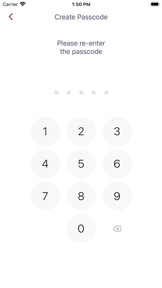
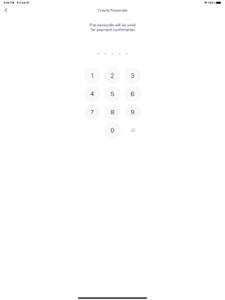
During the enrolment process you will set an authentication passcode that will be used to authenticate you online purchases via the app - alternatively you can choose to set up biometric authentication by means of fingerprint, if your device supports the feature.
Once the one-time enrolment process is complete, you are set to start shopping online:
When checking out purchases over a certain amount, at certain merchants, the payment screen will ask you to authenticate the purchase;
Simultaneously you will receive a push notification on your smart device which will prompt you to access the BOV 3D Secure app to authenticate the transaction either by passcode (established during enrollment) or biometrically, by means of your fingerprint.
The app will then advise that authentication is successful and you will be able to tap the "proceed" button on the payment screen to complete your purchase.
If you are in an area of no reception, or your device is not connected to an internet/data service, the payment screen will prompt you to scan a QR Code which will automatically launch the BOV 3D Secure app on your phone and following authentication a 6 digit code will be displayed. This code is to be inserted in the designated field on the payment screen. Following that simply tap the "proceed" button on the payment screen to complete your purchase.
Important information
Bank of Valletta will not contact you because you are using the app. So please stay alert to emails, text messages or phone calls that appear to be from us. Criminals may try to trick you into giving them sensitive personal or account information. Any suspicious communications or transactions should always be reported to Bank of Valletta immediately by calling the number on the reverse of your card, thus enabling immediate remedial action to be taken as necessary.
Hva er nytt i denne versjon? (BOV 3D Secure 1316 (1.3.241))
Minor update.
Informasjon
Utvikler
Kategorier
Versjon
BOV 3D Secure 1316 (1.3.241)
Størrelse
53,2 MB
Game Center
Nei
VPP Device Licensing
Ja
Vurdering
Aldersgrense: 4+
Kompatibilitet
iOS 12.0 eller senere
Enheter
iPhone 5s, iPhone 6, iPhone 6 Plus, iPhone 6s, iPhone 6s Plus, iPhone SE, iPhone 7, iPhone 7 Plus, iPhone 8, iPhone 8 Plus, iPhone X, iPhone XR, iPhone XS, iPhone XS Max, iPhone 11, iPhone 11 Pro, iPhone 11 Pro Max, iPhone SE (2. generasjon), iPhone 12, iPhone 12 Pro, iPhone 12 Pro Max, iPhone 12 mini, iPhone 13, iPhone 13 Pro, iPhone 13 Pro Max, iPhone 13 mini, iPhone SE (3. generasjon), iPhone 14, iPhone 14 Plus, iPhone 14 Pro, iPhone 14 Pro Max, iPhone 15, iPhone 15 Plus, iPhone 15 Pro, iPhone 15 Pro Max, iPhone 16, iPhone 16 Plus, iPhone 16 Pro, iPhone 16 Pro Max, iPhone 16e, iPhone 17, iPhone 17Pro, iPhone 17ProMax, iPhone Air, iPad (femte generasjon) Wi-Fi, iPad (femte generasjon) Wi-Fi + Cellular, iPad (6. generasjon) Wi-Fi, iPad (6. generasjon) Wi-Fi + Cellular, iPad Pro, iPad Pro (Cellular), iPad Pro (9,7-tommers), iPad Pro (9,7-tommers) (Cellular), 12,9-tommers iPad Pro (2. generasjon), 12,9-tommers iPad Pro (2. generasjon) Wi-Fi + Cellular, iPad Pro (10,5-tommer), iPad Pro (10,5-tommer) Wi-Fi + Cellular, iPad Pro (11-tommer), iPad Pro (11-tommer) Wi-Fi + Cellular, 12,9-tommers iPad Pro (3. generasjon), 12,9-tommers iPad Pro (3. generasjon) Wi-Fi + Cellular, iPad Air, iPad Air (Cellular), iPad Air 2, iPad Air 2 (Cellular), iPad Air (tredje generasjon), iPad Air (tredje generasjon) Wi-Fi + Cellular, iPad mini Retina, iPad mini Retina (Cellular), iPad mini 3, iPad mini 3 (Cellular), iPad mini 4, iPad mini 4 (Cellular), iPad mini (femte generasjon), iPad mini (femte generasjon) Wi-Fi + Cellular, iPad (7. generasjon) Wi-Fi + Cellular, iPad Pro (11-tommers, 2. generasjon), iPad Pro (11-tommers, 2. generasjon) Wi-Fi + Cellular, iPad Pro (12,9-tommers, 4. generasjon), iPad Pro (12,9-tommers, 4. generasjon) Wi-Fi + Cellular, iPad Air (fjerde generasjon) (Wi-Fi), iPad Air (fjerde generasjon) (Wi-Fi + Cellular), iPad (8. generasjon) Wi-Fi, iPad (8. generasjon) Wi-Fi + Cellular, iPad Pro (11-tommers, 3. generasjon), iPad Pro (11-tommers, 3. generasjon) Wi-Fi + Cellular, iPad Pro (12,9-tommers, femte generasjon), iPad Pro (12,9-tommers, femte generasjon) Wi-Fi + Cellular, iPad (9. generasjon), iPad (9. generasjon) Wi-Fi + Cellular, iPad mini (6. generasjon), iPad mini (6. generasjon) Wi-Fi + Cellular, iPad Air (5. generasjon), iPad Air (5. generasjon) Wi-Fi + Cellular, iPad Pro (11-tommers, 4. generasjon), iPad Pro (11-tommers, 4. generasjon) Wi-Fi + Cellular, 12,9-tommers iPad Pro (6. generasjon), 12,9-tommers iPad Pro (6. generasjon) Wi-Fi + Cellular, iPad (10. generasjon), iPad (10. generasjon) Wi-Fi + Cellular, 11-tommers iPad Air (M2) Wi-Fi, 13-tommers iPad Air (M2) Wi-Fi, 13-tommers iPad Air (M2) Wi-Fi + Cellular, 11-tommers iPad Pro (M4) Wi-Fi, 11-tommers iPad Pro (M4) Wi-Fi + Cellular, 13-tommers iPad Pro (M4) Wi-Fi, 13-tommers iPad Pro (M4) Wi-Fi + Cellular, iPad mini (A17 Pro) Wi-Fi, iPad mini (A17 Pro) Wi-Fi + Cellular, iPad (A16) Wi-Fi, iPad (A16) Wi-Fi + Cellular, 11-tommers iPad Air (M3) Wi-Fi, 11-tommers iPad Air (M3) Wi-Fi + Cellular, 13-tommers iPad Air (M3) Wi-Fi, 13-tommers iPad Air (M3) Wi-Fi + Cellular, iPad Pro11M5, iPad Pro11M5Cellular, iPad Pro13M5, iPad Pro13M5Cellular, iPod touch (sjette generasjon), iPod touch (7. generasjon)
Språk
engelsk
App Store: Poeng
Vurderinger og omtaler
0,0 av 5 (Ingen vurdering)
App Store: Omtaler
Ingen oppføring