Om ossBetingelserPersonvernKontakt
 
Oppdaterer
El Trackpad

El Trackpad

Utgivelsesdato: 2020-10-02
© 2020-2021 Hugo Lispector
El Trackpad - QR Code
Versjon 1.0.8
4+
Last ned fra App Store
Versjon 1.0.8
4+
Last ned fra App Store
Utgivelsesdato: 2020-10-02
© 2020-2021 Hugo Lispector

iPhone Screenshots

Skjermbilde
Skjermbilde
Skjermbilde
Skjermbilde
Skjermbilde
Skjermbilde
Skjermbilde
Skjermbilde
Skjermbilde
Skjermbilde

Beskrivelse

Transform your iPhone or iPad into a fully featured Mac trackpad with gestures support.
This app was written by a single person and was featured by 9to5Mac, Redmond Pie, AppAdvice, MacMagazine and more.
REVIEWS
“I’ve tried many similar apps before, but none of them worked as well as El Trackpad. Besides not having any notable lag, the app lets the user perform the same gestures as you can do on Apple’s Magic Trackpad.”
— 9to5Mac
“What makes El Trackpad so impressive here is the fact that it appears to be lag-free and works identically to an actual Apple Magic Trackpad, which is super awesome.”
— Redmond Pie
“If you’ve ever used a Magic Trackpad or the built-in version on any MacBook model, you’ll be right at home with the app.”
— AppAdvice
“This app transforms the iPhone/iPad into a complete trackpad for Macs, with multi-touch support and everything.”
— MacMagazine
DESCRIPTION
Move the mouse cursor with the slide of a finger and smoothly navigate through your content with inertial scrolling. Pinch to zoom, rotate with your fingers and much more. Control your Mac in real-time with no lag.
El Trackpad works like magic and has the features and touch gestures that you expect from a touchpad for a Mac computer.
GET STARTED
- Download and Install El trackpad on your iOS/iPadOS device and on your Mac.
- Enable accessibility features on the Mac app when prompted. This is required to control the mouse cursor.
- Connect the devices via USB cable.
SUPPORTED GESTURES
- Tap to click: Tap with one finger to click
- Secondary click: Tap with two fingers to right click
- Smart zoom: Double-tap with two fingers to zoom in and out
- Scroll: Slide two fingers to scroll
- Zoom: Pinch with two fingers to zoom
- Rotate: Move two fingers around each other to rotate
- Three-finger drag: Use three fingers to drag items on the screen
- Look up: Tap with three fingers to look up a word
- Show desktop: Spread your thumb and four fingers to show the desktop
- Launchpad: Pinch with your whole hand to show Launchpad
- Mission Control: Swipe up with four fingers to open mission control
- App Exposé: Swipe down with four fingers to open App Exposé
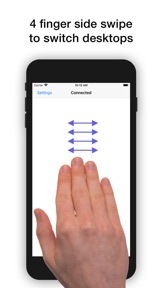
- Swipe between desktops: Swipe left or right with four fingers to move between full-screen apps or desktops
ADDITIONAL INFO
El Trackpad can be downloaded for free and offers a 7-day free trial with full functionality. After that, gestures with 2 fingers or more will no longer be recognized. At any time, you may unlock the app forever with a one-time in-app purchase.

Hva er nytt i denne versjon? (1.0.8)

- Fixed direction of swipe between desktops gesture when natural scroll direction is turned off.
- Fixed a bug that could cause the app to present an incorrect error message when an in-app purchase failed.

Selger

Informasjon

Kategorier

Versjon

1.0.8

Størrelse

15,4 MB

Game Center

Nei

VPP Device Licensing

Ja

Vurdering

Aldersgrense: 4+

Kompatibilitet

iOS 10.0 eller senere

Enheter

iPhone 5, iPhone 5c, iPhone 5s, iPhone 6, iPhone 6 Plus, iPhone 6s, iPhone 6s Plus, iPhone SE, iPhone 7, iPhone 7 Plus, iPhone 8, iPhone 8 Plus, iPhone X, iPhone XR, iPhone XS, iPhone XS Max, iPhone 11, iPhone 11 Pro, iPhone 11 Pro Max, iPhone SE (2. generasjon), iPhone 12, iPhone 12 Pro, iPhone 12 Pro Max, iPhone 12 mini, iPhone 13, iPhone 13 Pro, iPhone 13 Pro Max, iPhone 13 mini, iPhone SE (3. generasjon), iPhone 14, iPhone 14 Plus, iPhone 14 Pro, iPhone 14 Pro Max, iPhone 15, iPhone 15 Plus, iPhone 15 Pro, iPhone 15 Pro Max, iPhone 16, iPhone 16Plus, iPhone 16Pro, iPhone 16ProMax, iPad (fjerde generasjon) (Wi-Fi), iPad (fjerde generasjon) (4G), iPad (femte generasjon) Wi-Fi, iPad (femte generasjon) Wi-Fi + Cellular, iPad (6. generasjon) Wi-Fi, iPad (6. generasjon) Wi-Fi + Cellular, iPad Pro, iPad Pro (Cellular), iPad Pro (9,7-tommers), iPad Pro (9,7-tommers) (Cellular), 12,9-tommers iPad Pro (2. generasjon), 12,9-tommers iPad Pro (2. generasjon) Wi-Fi + Cellular, iPad Pro (10,5-tommer), iPad Pro (10,5-tommer) Wi-Fi + Cellular, iPad Pro (11-tommer), iPad Pro (11-tommer) Wi-Fi + Cellular, 12,9-tommers iPad Pro (3. generasjon), 12,9-tommers iPad Pro (3. generasjon) Wi-Fi + Cellular, iPad Air, iPad Air (Cellular), iPad Air 2, iPad Air 2 (Cellular), iPad Air (tredje generasjon), iPad Air (tredje generasjon) Wi-Fi + Cellular, iPad mini Retina, iPad mini Retina (Cellular), iPad mini 3, iPad mini 3 (Cellular), iPad mini 4, iPad mini 4 (Cellular), iPad mini (femte generasjon), iPad mini (femte generasjon) Wi-Fi + Cellular, iPad (7. generasjon) Wi-Fi + Cellular, iPad Pro (11-tommers, 2. generasjon), iPad Pro (11-tommers, 2. generasjon) Wi-Fi + Cellular, iPad Pro (12,9-tommers, 4. generasjon), iPad Pro (12,9-tommers, 4. generasjon) Wi-Fi + Cellular, iPad Air (fjerde generasjon) (Wi-Fi), iPad Air (fjerde generasjon) (Wi-Fi + Cellular), iPad (8. generasjon) Wi-Fi, iPad (8. generasjon) Wi-Fi + Cellular, iPad Pro (11-tommers, 3. generasjon), iPad Pro (11-tommers, 3. generasjon) Wi-Fi + Cellular, iPad Pro (12,9-tommers, femte generasjon), iPad Pro (12,9-tommers, femte generasjon) Wi-Fi + Cellular, iPad (9. generasjon), iPad (9. generasjon) Wi-Fi + Cellular, iPad mini (6. generasjon), iPad mini (6. generasjon) Wi-Fi + Cellular, iPad Air (5. generasjon), iPad Air (5. generasjon) Wi-Fi + Cellular, iPad Pro (11-tommers, 4. generasjon), iPad Pro (11-tommers, 4. generasjon) Wi-Fi + Cellular, 12,9-tommers iPad Pro (6. generasjon), 12,9-tommers iPad Pro (6. generasjon) Wi-Fi + Cellular, iPad (10. generasjon), iPad (10. generasjon) Wi-Fi + Cellular, 11-tommers iPad Air (M2) Wi-Fi, 13-tommers iPad Air (M2) Wi-Fi, 13-tommers iPad Air (M2) Wi-Fi + Cellular, 11-tommers iPad Pro (M4) Wi-Fi, 11-tommers iPad Pro (M4) Wi-Fi + Cellular, 13-tommers iPad Pro (M4) Wi-Fi, 13-tommers iPad Pro (M4) Wi-Fi + Cellular, iPad MiniA17Pro, iPad MiniA17ProCellular, iPod touch (sjette generasjon), iPod touch (7. generasjon)

Språk

engelsk

App Store: Poeng

Vurderinger og omtaler

4,0 av 5 (1 Vurdering)

App Store: Omtaler

2021-08-22

Not quite full-featured…

…as it unfortunately doesn’t offer any “swipe to return” gesture when web browsing. Still, cursor movement and scrolling is excellent, with no apparent latency.
Mr. Last Available Name
Versjon 1.0.8