Om ossBetingelserPersonvernKontakt
 
Oppdaterer
Klipsch Connect

Klipsch Connect

Utgivelsesdato: 2020-03-06
© 2020-2023 Klipsch Group, Inc.
Klipsch Connect - QR Code
Versjon 1.20.0
4+
Last ned fra App Store
Versjon 1.20.0
4+
Last ned fra App Store
Utgivelsesdato: 2020-03-06
© 2020-2023 Klipsch Group, Inc.

iPhone Screenshots

Skjermbilde
Skjermbilde
Skjermbilde
Skjermbilde
Skjermbilde
Skjermbilde
Skjermbilde

iPad Screenshots

Skjermbilde
Skjermbilde
Skjermbilde
Skjermbilde
Skjermbilde

Beskrivelse

Need support or have a feature suggestion? Please reach out to our Product Support team:
• Live Chat in the App or
• https://support.klipsch.com or
• +1-800-KLIPSCH
Klipsch Connect™ works with:
• The One Plus and The Three Plus tabletop speakers
• The Fives, The Sevens, The Nines, and The Nines McLaren powered monitors
• Cinema 700, 800 and 1200 Series soundbars
• Cinema 600 Series soundbar
• T5 Series True Wireless earphones
• T5 II series True Wireless earphones
• T5 II ANC series True Wireless earphones
You can easily personalize your experience by adjusting EQ, transparency, and ANC settings. Soundbar and Powered Monitor products all support Virtual Remote Control. You can install feature updates, troubleshoot common issues, contact product support - including in-app Live Chat, and much more.
Features (availability varies by product):
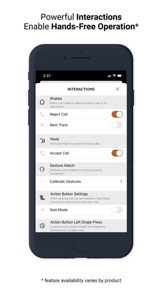
• Virtual Remote Control
• EQ Presets
• Custom EQ Adjustments
• ANC Level Control
• Transparency Mode & Level
• Dirac HD Sound
• Dynamic Bass Control - a.k.a. "Loudness"
• Room Placement Control - a.k.a. "Bass Cut Mode"
• Dolby Atmos (tm) Sound Mode Control
• Night Mode and Dialog Mode Control
• Channel-Specific Volume Control
• Subwoofer Volume Control
• Bragi AI, Moves & Sidekicks
• Battery Level & Status
• Live Chat with Support (during business hours)
• Quick-Start Guides & Product Manuals
• How-To Videos and FAQs
• Product Firmware and Feature Updates
• Product Registration
• Easy Access to Product Support
IMPORTANT FIVES UPDATE: If you cannot connect after you run the Fives Updater app, that means Step 1 did not complete successfully. Make sure to run the USB update. If you need help, we're here for you - please reach out to Product Support (link below) and we'll help you complete the update.
How to Access Cinema Soundbar and Fives, Sevens, and Nines Virtual Remote Capabilities:
Cinema 1200, 800, and 700
Virtual Remote Control and EQ features require the soundbar be running the latest update. This normally happens automatically when the soundbar has been connected to the Internet, either via Klipsch Connect or Google Home. If your device has not been connected to the Internet, please contact our Product Support Team for assistance. See details below.
The Fives, The Sevens, and The Nines, including McLaren Editions
Virtual Remote Control and EQ features require the powered monitors be running the latest update. If you have not updated your Fives already, please download the free "Klipsch The Fives Updater" app. This will walk you through the update process. After the update is complete, all future updates will come through Klipsch Connect. Our Product Support team can walk you through the entire process. Simply reach out to us at:
• Live Chat in the App! or
• https://support.klipsch.com or
• +1-800-KLIPSCH

Hva er nytt i denne versjon? (1.20.0)

• Added support for Music City products
• Visual improvements
• Tweaks and bug fixes based on customer feedback

Selger

Navn

Klipsch Group, Inc.

Informasjon

Kategorier

Versjon

1.20.0

Størrelse

267,2 MB

Game Center

Nei

VPP Device Licensing

Ja

Vurdering

Aldersgrense: 4+

Kompatibilitet

iOS 12.4 eller senere

Enheter

iPhone 5s, iPhone 6, iPhone 6 Plus, iPhone 6s, iPhone 6s Plus, iPhone SE, iPhone 7, iPhone 7 Plus, iPhone 8, iPhone 8 Plus, iPhone X, iPhone XR, iPhone XS, iPhone XS Max, iPhone 11, iPhone 11 Pro, iPhone 11 Pro Max, iPhone SE (2. generasjon), iPhone 12, iPhone 12 Pro, iPhone 12 Pro Max, iPhone 12 mini, iPhone 13, iPhone 13 Pro, iPhone 13 Pro Max, iPhone 13 mini, iPhone SE (3. generasjon), iPhone 14, iPhone 14 Plus, iPhone 14 Pro, iPhone 14 Pro Max, iPhone 15, iPhone 15 Plus, iPhone 15 Pro, iPhone 15 Pro Max, iPad (femte generasjon) Wi-Fi, iPad (femte generasjon) Wi-Fi + Cellular, iPad (6. generasjon) Wi-Fi, iPad (6. generasjon) Wi-Fi + Cellular, iPad Pro, iPad Pro (Cellular), iPad Pro (9,7-tommers), iPad Pro (9,7-tommers) (Cellular), 12,9-tommers iPad Pro (2. generasjon), 12,9-tommers iPad Pro (2. generasjon) Wi-Fi + Cellular, iPad Pro (10,5-tommer), iPad Pro (10,5-tommer) Wi-Fi + Cellular, iPad Pro (11-tommer), iPad Pro (11-tommer) Wi-Fi + Cellular, 12,9-tommers iPad Pro (3. generasjon), 12,9-tommers iPad Pro (3. generasjon) Wi-Fi + Cellular, iPad Air, iPad Air (Cellular), iPad Air 2, iPad Air 2 (Cellular), iPad Air (tredje generasjon), iPad Air (tredje generasjon) Wi-Fi + Cellular, iPad mini Retina, iPad mini Retina (Cellular), iPad mini 3, iPad mini 3 (Cellular), iPad mini 4, iPad mini 4 (Cellular), iPad mini (femte generasjon), iPad mini (femte generasjon) Wi-Fi + Cellular, iPad (7. generasjon) Wi-Fi + Cellular, iPad Pro (11-tommers, 2. generasjon), iPad Pro (11-tommers, 2. generasjon) Wi-Fi + Cellular, iPad Pro (12,9-tommers, 4. generasjon), iPad Pro (12,9-tommers, 4. generasjon) Wi-Fi + Cellular, iPad Air (fjerde generasjon) (Wi-Fi), iPad Air (fjerde generasjon) (Wi-Fi + Cellular), iPad (8. generasjon) Wi-Fi, iPad (8. generasjon) Wi-Fi + Cellular, iPad Pro (11-tommers, 3. generasjon), iPad Pro (11-tommers, 3. generasjon) Wi-Fi + Cellular, iPad Pro (12,9-tommers, femte generasjon), iPad Pro (12,9-tommers, femte generasjon) Wi-Fi + Cellular, iPad (9. generasjon), iPad (9. generasjon) Wi-Fi + Cellular, iPad mini (6. generasjon), iPad mini (6. generasjon) Wi-Fi + Cellular, iPad Air (5. generasjon), iPad Air (5. generasjon) Wi-Fi + Cellular, iPad Pro (11-tommers, 4. generasjon), iPad Pro (11-tommers, 4. generasjon) Wi-Fi + Cellular, 12,9-tommers iPad Pro (6. generasjon), 12,9-tommers iPad Pro (6. generasjon) Wi-Fi + Cellular, iPad (10. generasjon), iPad (10. generasjon) Wi-Fi + Cellular, iPod touch (sjette generasjon), iPod touch (7. generasjon)

Språk

engelsk, fransk, indonesisk, italiensk, japansk, kinesisk, koreansk, portugisisk, russisk, spansk, tysk

App Store: Poeng

Vurderinger og omtaler

3,0 av 5 (25 Vurderinger)

App Store: Omtaler

2023-05-05

What’s the point?

Ok, I’m being harsh here. The good first. The app will connect and recognise your speakers. You can name them and update their firmware. Though no new firmware was available on my year old speakers, so why bother? You can disable/ensble the dynamic bass boost, after turning the bass down for «room correction». Again, why?
Then the irksome: The setup claims and explains an eq option. But when setup is done, there is no equaliser!!! Only options to see that you are, indeed as my phone’s bt-settings tell me, connected. And a rename option, and links to guides. Where’s the eq? Where’s the dynamic bass option, the room option?
Useless, is what it is. Deleted.
Neftun
Versjon 1.15.0
2023-04-22

Does it’s job

Good enough
Annoying how it pauses the app on opening to check for updates every time
TheNygard
Versjon 1.15.0
2022-10-20

Not good

App bad
Produkt is bad
hifi 1770
Versjon 1.12.1
2022-08-03

Virker ikke med Fives

Har oppdatert firmware og ser EQ settings osv… men ingen ting skjer når jeg endrer på EQ. Til å være mellomklasse høyttaler fra en anerkjent produsent syns jeg dette fremstå som et prøveprosjekt.
Bangbox
Versjon v1.12.0
2022-06-13

Finally all things sorted out with cinema 1200

Thank you for fixing all issues. The soundbar works now PERFECTLY
Nolol
Versjon 1.11.0
2021-12-06

No customisation

Please add eq and remote control to the cinema 600
FuFu_Phantom
Versjon 1.8.0
2021-09-08

Easy to use

Headphones
Mikkelseeeen
Versjon 1.7.3