Oppdaterer


iPhone Screenshots

iPad Screenshots




Beskrivelse
Celtic Sounds is a fully transposable MIDI sound module with seven traditional Irish and Scottish musical instruments:
High-D Tin Whistle
Wooden Flute
Uilleann Pipes Chanter, Drones, and Baritone/Tenor Regulator Pairs
Anglo Concertina
Button Accordion
Great Highland Bagpipes Chanter and Drones
Scottish Smallpipes Chanter and Drones
Every note on the instruments have been individually to provide a very authentic sound.
The app is a CoreMIDI Sound Module for use with CoreMIDI file players and other CoreMIDI controller apps.
You may also play the sounds using a MIDI keyboard or other MIDI controller attached to the device using a MIDI interface connected to the Lightning port.
The app also works as an Audiobus 2 source module and is compatible with Audiobus 3. Inter-App Audio support is provided by Audiobus.
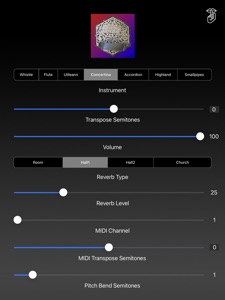
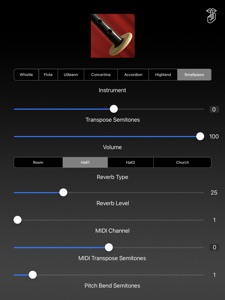
Using the controls, set your instrument, transposition, volume, reverb style, reverb level, MIDI channel, and MIDI pitch bend values.
Use the "Transpose Semitones" slider to shift the entire instrument up or down up to one octave in semitone increments.
This setting shifts the pitch of the sound but does not change the MIDI note numbers the app responds to.
Touch the number to the right of the "Transpose Semitones" slider to reset the transposition to zero semitones.
Choose your reverb style and level from four options: Room, Hall1, Hall2, or Church
If you have a MIDI "stuck note" touch the "Shhh" button at the top right to stop all sounds.
The app responds to both MIDI note-on velocity and pitch bend messages on the selected MIDI channel.
Set the maximum pitch bend response using the "Pitch Bend Semitones". Default is two semitones.
The MIDI note ranges of the instruments are:
High-D Tin Whistle - D3 (62) - D5 (86)
Wooden Flute - D3 (62) - D5 (86)
Anglo Concertina - C2 (48) - A5 (93)
Button Accordion - G2 (53) - E5 (88)
Highland Pipes - A3 (68) - Bb4 (82)
Smallpipes - A3 (68) - Bb4 (82)
When playing the Uilleann Pipes instrument, the following special MIDI notes, starting on C1 (36) are used for the drone and regulator sounds:
Single regulator notes:
C1 (36) - Bass regulator G
C#1 (37) - Bass regulator A
D1 (38) - Bass regulator B
D#1 (39) - Bass regulator C
E1 (40) - Baritone regulator D
F1 (41) - Baritone regulator F#
F#1 (42) - Baritone regulator G
G1 (43) - Baritone regulator A
G#1 (44) - Tenor regulator F#
A1 (45) - Tenor regulator G
A#1 (46) - Tenor regulator A
B1 (47) - Tenor regulator B
C2 (48) - Tenor regulator C
Drones:
D2 (50) - Lynch Drones
D#2(51) - Crowley Drones
Regulator pairs:
E2 (52) - D/F# Baritone/Tenor Regulator Pair
F2 (53) - D/G Baritone/Tenor Regulator Pair
F#2 (54) - F#/A Baritone/Tenor Regulator Pair
G2 (55) - G/B Baritone/Tenor Regulator Pair
G#2 (56) - G/C Baritone/Tenor Regulator Pair
A2 (57) - A/C Baritone/Tenor Regulator Pair
Uilleann Pipes drones key triggers (D2 and D#2) are "latching" . The drones start on the first press of the trigger key, stop on the second.
The Uilleann Pipes chanter notes start at D3 (62) and go to D5 (86)
When playing the Great Highland Bagpipes and Smallpipes instruments, the drones, are triggered on receipt of D#2 (51) and are latching.
The drones start on the first press of the trigger key, stop on the second.
When playing the bagpipes instruments, any pitch bend messages received only effect the chanter notes, not the drones or regulators.
The bagpipes instruments are setup for the default WARBL GHB controller note mapping for notes and drone switch.
MIDI Transpose Control for use with MIDI Chanters and other MIDI controllers:
Use the "MIDI Transpose Semitones" slider to shift the incoming MIDI note messages up or down up to one octave in semitone increments.
This is useful for MIDI chanters or other controllers that have a fixed message range.
Touch the number to the right of the "MIDI Transpose Semitones" slider to reset the MIDI transposition to zero semitones.
Hva er nytt i denne versjon? (3.0.1)
New instruments:
Great Highland Bagpipes
Scottish Smallpipes
New display of the currently selected instrument at the top of the screen.
For the bagpipes instruments, you may touch the instrument display to toggle the drones on and off.
To quiet any "stuck" notes, touch the new "Shh" icon on the upper right of the screen.
Bug fixes:
The drones now follow the semitone pitch shift control value.
Selger
Navn
Michael Eskin
Informasjon
Utvikler
Kategorier
Versjon
3.0.1
Størrelse
181,8 MB
Game Center
Nei
VPP Device Licensing
Ja
Vurdering
Aldersgrense: 4+
Kompatibilitet
iOS 13.0 eller senere
Enheter
iPhone 5s, iPhone 6, iPhone 6 Plus, iPhone 6s, iPhone 6s Plus, iPhone SE, iPhone 7, iPhone 7 Plus, iPhone 8, iPhone 8 Plus, iPhone X, iPhone XR, iPhone XS, iPhone XS Max, iPhone 11, iPhone 11 Pro, iPhone 11 Pro Max, iPhone SE (2. generasjon), iPhone 12, iPhone 12 Pro, iPhone 12 Pro Max, iPhone 12 mini, iPhone 13, iPhone 13 Pro, iPhone 13 Pro Max, iPhone 13 mini, iPhone SE (3. generasjon), iPhone 14, iPhone 14 Plus, iPhone 14 Pro, iPhone 14 Pro Max, iPhone 15, iPhone 15 Plus, iPhone 15 Pro, iPhone 15 Pro Max, iPhone 16, iPhone 16 Plus, iPhone 16 Pro, iPhone 16 Pro Max, iPhone 16e, iPad (femte generasjon) Wi-Fi, iPad (femte generasjon) Wi-Fi + Cellular, iPad (6. generasjon) Wi-Fi, iPad (6. generasjon) Wi-Fi + Cellular, iPad Pro, iPad Pro (Cellular), iPad Pro (9,7-tommers), iPad Pro (9,7-tommers) (Cellular), 12,9-tommers iPad Pro (2. generasjon), 12,9-tommers iPad Pro (2. generasjon) Wi-Fi + Cellular, iPad Pro (10,5-tommer), iPad Pro (10,5-tommer) Wi-Fi + Cellular, iPad Pro (11-tommer), iPad Pro (11-tommer) Wi-Fi + Cellular, 12,9-tommers iPad Pro (3. generasjon), 12,9-tommers iPad Pro (3. generasjon) Wi-Fi + Cellular, iPad Air, iPad Air (Cellular), iPad Air 2, iPad Air 2 (Cellular), iPad Air (tredje generasjon), iPad Air (tredje generasjon) Wi-Fi + Cellular, iPad mini Retina, iPad mini Retina (Cellular), iPad mini 3, iPad mini 3 (Cellular), iPad mini 4, iPad mini 4 (Cellular), iPad mini (femte generasjon), iPad mini (femte generasjon) Wi-Fi + Cellular, iPad (7. generasjon) Wi-Fi + Cellular, iPad Pro (11-tommers, 2. generasjon), iPad Pro (11-tommers, 2. generasjon) Wi-Fi + Cellular, iPad Pro (12,9-tommers, 4. generasjon), iPad Pro (12,9-tommers, 4. generasjon) Wi-Fi + Cellular, iPad Air (fjerde generasjon) (Wi-Fi), iPad Air (fjerde generasjon) (Wi-Fi + Cellular), iPad (8. generasjon) Wi-Fi, iPad (8. generasjon) Wi-Fi + Cellular, iPad Pro (11-tommers, 3. generasjon), iPad Pro (11-tommers, 3. generasjon) Wi-Fi + Cellular, iPad Pro (12,9-tommers, femte generasjon), iPad Pro (12,9-tommers, femte generasjon) Wi-Fi + Cellular, iPad (9. generasjon), iPad (9. generasjon) Wi-Fi + Cellular, iPad mini (6. generasjon), iPad mini (6. generasjon) Wi-Fi + Cellular, iPad Air (5. generasjon), iPad Air (5. generasjon) Wi-Fi + Cellular, iPad Pro (11-tommers, 4. generasjon), iPad Pro (11-tommers, 4. generasjon) Wi-Fi + Cellular, 12,9-tommers iPad Pro (6. generasjon), 12,9-tommers iPad Pro (6. generasjon) Wi-Fi + Cellular, iPad (10. generasjon), iPad (10. generasjon) Wi-Fi + Cellular, 11-tommers iPad Air (M2) Wi-Fi, 13-tommers iPad Air (M2) Wi-Fi, 13-tommers iPad Air (M2) Wi-Fi + Cellular, 11-tommers iPad Pro (M4) Wi-Fi, 11-tommers iPad Pro (M4) Wi-Fi + Cellular, 13-tommers iPad Pro (M4) Wi-Fi, 13-tommers iPad Pro (M4) Wi-Fi + Cellular, iPad mini (A17 Pro) Wi-Fi, iPad mini (A17 Pro) Wi-Fi + Cellular, iPad (A16) Wi-Fi, iPad (A16) Wi-Fi + Cellular, 11-tommers iPad Air (M3) Wi-Fi, 11-tommers iPad Air (M3) Wi-Fi + Cellular, 13-tommers iPad Air (M3) Wi-Fi, 13-tommers iPad Air (M3) Wi-Fi + Cellular, iPod touch (sjette generasjon), iPod touch (7. generasjon)
Språk
engelsk
App Store: Poeng
Vurderinger og omtaler
5,0 av 5 (1 Vurdering)
App Store: Omtaler
Ingen oppføring