Oppdaterer


iPhone Screenshots





iPad Screenshots


Beskrivelse
Are you a freelancer or contractor? Do you manually keep track of your timesheets? Are you tired of constantly forgetting on Friday how many hours you worked on Monday? Whether you work one job site or multiple on a given day, this app is for you.
Easy Hours Lite is the new way to track time just by having your device. Free yourself. Start using Easy Hours Lite today.
TIMESHEETS
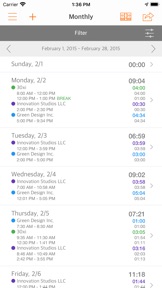
See how your time is spent from week to week even when the device is offline. Easy Hours summarizes your weekly activities so that you can spend your time doing instead of remembering. Whether you work Saturday to Friday or Monday to Sunday, you decide how you manage your week. We provide weekly and daily views of all time entries.
DASHBOARDS
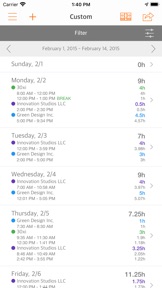
Do you work multiple projects on a given day? We provide Yearly, Monthly, Weekly, Daily and Custom summaries of your time across all jobs. With advanced filter capability, view your Dashboard your way. Now with the Job dashboard you have an efficient way to swipe through all your jobs for the current day, start / stop time, take a break, add memos and more.
Whether you need the convenience of a bi-weekly dashboard or a dashboard with a 90 day interval, we've got you covered. Simply set a date range in the Custom dashboard and let Easy Hours do the heavy lifting.
CHARTS
Visualize your time with Charts. We support Pie Charts, Line Charts and Bar Charts. Want to share your Chart with someone else? We've got that too!
TIME TRACKING
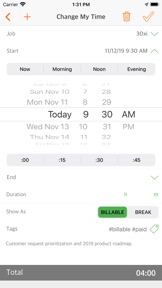
Pause and restart time tracking with the tap of a button. Taking a break was never so easy. Edit times with a few taps of a button. Add new times because you accidentally left your device at home. With shortcuts for Now, Morning, Afternoon, Evening, :00, :15, :30 and :45, changing time is easy and fast. You can even split your time entry and Easy Hours will copy over any tags and memos.
MEMOS
Need to keep track of what you did at a particular time on a given day? Easy Hours allows you to attach notes that you can use to remind yourself.
TAGS
Tag your times with keywords such as "paid", "holiday" or "lunch break". Multiple tags can be applied to a time entry and you can re-use tags. Tags can also be applied in bulk to a set of time entries filtered by date range, jobs and/or tags.
FILTERING
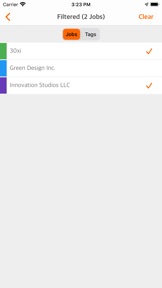
More powerful filtering that works hand in gloves with your tags. Filter using Jobs, Tags or any combination of both. Sharing uses Filters just like you would expect too.
COLORS
Use colors to uniquely customize your jobs and your reports.
ROUNDING
Do you prefer round numbers when calculating your total hours? Personalize your timesheet to calculate your total hours exactly as you want it.
CURRENCY
Use a different currency to bill your clients? We provide support for most currency combinations with the exception of Federation and Galactic Credits.
LANDSCAPE
Unlike some of our competitors, yes we support landscape! Go on and rotate your device, we dare you!
3D TOUCH
For those with compatible devices, 3D Touch has been incorporated to make usage more fun and exciting. Use 3D Touch to jump to your Weekly, Monthly, Custom Dashboards or Charts.
SHARE TIME
With the convenience of sharing by Email, AirPrint, DropBox, AirDrop, Numbers and more you can let anyone, including yourself, know exactly how long you have been working on a task. We even attach a CSV file to the email for convenient importing into any app. Whether you share time from your weekly, monthly, yearly or custom dashboard the export has that great look and feel you expect, too. You can even personalize your report by choosing a color theme, your Name and Organization, choosing your export format and whether to include individual time entries. We even include your memos.
PERSONALIZED DAILY REMINDERS
Easy Hours lets you decide if you’ve spent too much time on a task. It is smart enough to know when you should call it a day. We provide personalized reminders instead of the usual plain old notifications.
Hva er nytt i denne versjon? (9.4.0)
* Miscellaneous bug fixes and improvements.
Selger
Navn
30xi LLC
Informasjon
Utvikler
Kategorier
Versjon
9.4.0
Størrelse
31,5 MB
Game Center
Nei
VPP Device Licensing
Ja
Vurdering
Aldersgrense: 4+
Kompatibilitet
iOS 11.0 eller senere
Enheter
iPhone 5s, iPhone 6, iPhone 6 Plus, iPhone 6s, iPhone 6s Plus, iPhone SE, iPhone 7, iPhone 7 Plus, iPhone 8, iPhone 8 Plus, iPhone X, iPhone XR, iPhone XS, iPhone XS Max, iPhone 11, iPhone 11 Pro, iPhone 11 Pro Max, iPhone SE (2. generasjon), iPhone 12, iPhone 12 Pro, iPhone 12 Pro Max, iPhone 12 mini, iPhone 13, iPhone 13 Pro, iPhone 13 Pro Max, iPhone 13 mini, iPhone SE (3. generasjon), iPhone 14, iPhone 14 Plus, iPhone 14 Pro, iPhone 14 Pro Max, iPhone 15, iPhone 15 Plus, iPhone 15 Pro, iPhone 15 Pro Max, iPhone 16, iPhone 16 Plus, iPhone 16 Pro, iPhone 16 Pro Max, iPhone 16e, iPhone 17, iPhone 17Pro, iPhone 17ProMax, iPhone Air, iPad (femte generasjon) Wi-Fi, iPad (femte generasjon) Wi-Fi + Cellular, iPad (6. generasjon) Wi-Fi, iPad (6. generasjon) Wi-Fi + Cellular, iPad Pro, iPad Pro (Cellular), iPad Pro (9,7-tommers), iPad Pro (9,7-tommers) (Cellular), 12,9-tommers iPad Pro (2. generasjon), 12,9-tommers iPad Pro (2. generasjon) Wi-Fi + Cellular, iPad Pro (10,5-tommer), iPad Pro (10,5-tommer) Wi-Fi + Cellular, iPad Pro (11-tommer), iPad Pro (11-tommer) Wi-Fi + Cellular, 12,9-tommers iPad Pro (3. generasjon), 12,9-tommers iPad Pro (3. generasjon) Wi-Fi + Cellular, iPad Air, iPad Air (Cellular), iPad Air 2, iPad Air 2 (Cellular), iPad Air (tredje generasjon), iPad Air (tredje generasjon) Wi-Fi + Cellular, iPad mini Retina, iPad mini Retina (Cellular), iPad mini 3, iPad mini 3 (Cellular), iPad mini 4, iPad mini 4 (Cellular), iPad mini (femte generasjon), iPad mini (femte generasjon) Wi-Fi + Cellular, iPad (7. generasjon) Wi-Fi + Cellular, iPad Pro (11-tommers, 2. generasjon), iPad Pro (11-tommers, 2. generasjon) Wi-Fi + Cellular, iPad Pro (12,9-tommers, 4. generasjon), iPad Pro (12,9-tommers, 4. generasjon) Wi-Fi + Cellular, iPad Air (fjerde generasjon) (Wi-Fi), iPad Air (fjerde generasjon) (Wi-Fi + Cellular), iPad (8. generasjon) Wi-Fi, iPad (8. generasjon) Wi-Fi + Cellular, iPad Pro (11-tommers, 3. generasjon), iPad Pro (11-tommers, 3. generasjon) Wi-Fi + Cellular, iPad Pro (12,9-tommers, femte generasjon), iPad Pro (12,9-tommers, femte generasjon) Wi-Fi + Cellular, iPad (9. generasjon), iPad (9. generasjon) Wi-Fi + Cellular, iPad mini (6. generasjon), iPad mini (6. generasjon) Wi-Fi + Cellular, iPad Air (5. generasjon), iPad Air (5. generasjon) Wi-Fi + Cellular, iPad Pro (11-tommers, 4. generasjon), iPad Pro (11-tommers, 4. generasjon) Wi-Fi + Cellular, 12,9-tommers iPad Pro (6. generasjon), 12,9-tommers iPad Pro (6. generasjon) Wi-Fi + Cellular, iPad (10. generasjon), iPad (10. generasjon) Wi-Fi + Cellular, 11-tommers iPad Air (M2) Wi-Fi, 13-tommers iPad Air (M2) Wi-Fi, 13-tommers iPad Air (M2) Wi-Fi + Cellular, 11-tommers iPad Pro (M4) Wi-Fi, 11-tommers iPad Pro (M4) Wi-Fi + Cellular, 13-tommers iPad Pro (M4) Wi-Fi, 13-tommers iPad Pro (M4) Wi-Fi + Cellular, iPad mini (A17 Pro) Wi-Fi, iPad mini (A17 Pro) Wi-Fi + Cellular, iPad (A16) Wi-Fi, iPad (A16) Wi-Fi + Cellular, 11-tommers iPad Air (M3) Wi-Fi, 11-tommers iPad Air (M3) Wi-Fi + Cellular, 13-tommers iPad Air (M3) Wi-Fi, 13-tommers iPad Air (M3) Wi-Fi + Cellular, iPod touch (sjette generasjon), iPod touch (7. generasjon)
Språk
engelsk, spansk, tysk
App Store: Poeng
Vurderinger og omtaler
0,0 av 5 (Ingen vurdering)
App Store: Omtaler
Ingen oppføring