Oppdaterer


iPhone Screenshots


iPad Screenshots



Beskrivelse
Ditch the office scanner!
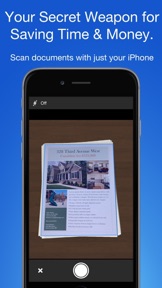
Just snap a photo of your document, and get a PDF file you can instantly send to your colleagues, all from your phone or iPad.
TACK SHARP SCANS
That processor in your phone is quite a little monster. Smart Scanner uses it fully to make the best possible scans. Even full-page articles come out tack-sharp and easy to read.
It automatically detects the page edges and corrects for perspective. Pick full-color scans, grayscale, or black-and-white for maximum legibility. FlashAssist can take perfect scans even in poor lighting conditions. You can even change the correction and enhancement settings after the fact.
POWERFUL COLOR-CODED ORGANIZATION
Scanning is just half the problem. You need a good way to keep all your documents organized, and easy to find later. Smart Scanner uses a simple tagging system that is much easier and more powerful than the regular folder system. File documents under custom color-coded categories with just a couple taps. Browse and sort files by category with a couple more.
It's the way filing should work.
FOR ALL YOUR SCANNING NEEDS
+ Quickly scan and send contracts and forms
+ Keep scans of important documents in your pocket, separate form the Photo Library
+ Scan all your travel receipts for easy expense reports
+ Keep digital copies of your notes and sketches
+ Scan articles to read later
+ And more!
TIPS AND TRICKS
Here are a few tips to get the best scans:
+ Place your document on a darker surface to improve the edge auto-detection.
+ You can drag the corners of the blue rectangle to fine tune it after taking a photo.
+ Make sure there is adequate lighting. Use the flash in low-light conditions.
+ You can tap on a page to edit its scan settings (including edges) after the fact.
Hva er nytt i denne versjon? (2.4)
+ Fixed some UI color issues
Selger
Navn
Qrayon, LLC
Informasjon
Utvikler
Kategorier
Versjon
2.4
Størrelse
20,4 MB
Game Center
Nei
VPP Device Licensing
Ja
Vurdering
Aldersgrense: 4+
Kompatibilitet
iOS 12.0 eller senere
Enheter
iPhone 5s, iPhone 6, iPhone 6 Plus, iPhone 6s, iPhone 6s Plus, iPhone SE, iPhone 7, iPhone 7 Plus, iPhone 8, iPhone 8 Plus, iPhone X, iPhone XR, iPhone XS, iPhone XS Max, iPhone 11, iPhone 11 Pro, iPhone 11 Pro Max, iPhone SE (2. generasjon), iPhone 12, iPhone 12 Pro, iPhone 12 Pro Max, iPhone 12 mini, iPhone 13, iPhone 13 Pro, iPhone 13 Pro Max, iPhone 13 mini, iPhone SE (3. generasjon), iPhone 14, iPhone 14 Plus, iPhone 14 Pro, iPhone 14 Pro Max, iPhone 15, iPhone 15 Plus, iPhone 15 Pro, iPhone 15 Pro Max, iPhone 16, iPhone 16Plus, iPhone 16Pro, iPhone 16ProMax, iPad (femte generasjon) Wi-Fi, iPad (femte generasjon) Wi-Fi + Cellular, iPad (6. generasjon) Wi-Fi, iPad (6. generasjon) Wi-Fi + Cellular, iPad Pro, iPad Pro (Cellular), iPad Pro (9,7-tommers), iPad Pro (9,7-tommers) (Cellular), 12,9-tommers iPad Pro (2. generasjon), 12,9-tommers iPad Pro (2. generasjon) Wi-Fi + Cellular, iPad Pro (10,5-tommer), iPad Pro (10,5-tommer) Wi-Fi + Cellular, iPad Pro (11-tommer), iPad Pro (11-tommer) Wi-Fi + Cellular, 12,9-tommers iPad Pro (3. generasjon), 12,9-tommers iPad Pro (3. generasjon) Wi-Fi + Cellular, iPad Air, iPad Air (Cellular), iPad Air 2, iPad Air 2 (Cellular), iPad Air (tredje generasjon), iPad Air (tredje generasjon) Wi-Fi + Cellular, iPad mini Retina, iPad mini Retina (Cellular), iPad mini 3, iPad mini 3 (Cellular), iPad mini 4, iPad mini 4 (Cellular), iPad mini (femte generasjon), iPad mini (femte generasjon) Wi-Fi + Cellular, iPad (7. generasjon) Wi-Fi + Cellular, iPad Pro (11-tommers, 2. generasjon), iPad Pro (11-tommers, 2. generasjon) Wi-Fi + Cellular, iPad Pro (12,9-tommers, 4. generasjon), iPad Pro (12,9-tommers, 4. generasjon) Wi-Fi + Cellular, iPad Air (fjerde generasjon) (Wi-Fi), iPad Air (fjerde generasjon) (Wi-Fi + Cellular), iPad (8. generasjon) Wi-Fi, iPad (8. generasjon) Wi-Fi + Cellular, iPad Pro (11-tommers, 3. generasjon), iPad Pro (11-tommers, 3. generasjon) Wi-Fi + Cellular, iPad Pro (12,9-tommers, femte generasjon), iPad Pro (12,9-tommers, femte generasjon) Wi-Fi + Cellular, iPad (9. generasjon), iPad (9. generasjon) Wi-Fi + Cellular, iPad mini (6. generasjon), iPad mini (6. generasjon) Wi-Fi + Cellular, iPad Air (5. generasjon), iPad Air (5. generasjon) Wi-Fi + Cellular, iPad Pro (11-tommers, 4. generasjon), iPad Pro (11-tommers, 4. generasjon) Wi-Fi + Cellular, 12,9-tommers iPad Pro (6. generasjon), 12,9-tommers iPad Pro (6. generasjon) Wi-Fi + Cellular, iPad (10. generasjon), iPad (10. generasjon) Wi-Fi + Cellular, 11-tommers iPad Air (M2) Wi-Fi, 13-tommers iPad Air (M2) Wi-Fi, 13-tommers iPad Air (M2) Wi-Fi + Cellular, 11-tommers iPad Pro (M4) Wi-Fi, 11-tommers iPad Pro (M4) Wi-Fi + Cellular, 13-tommers iPad Pro (M4) Wi-Fi, 13-tommers iPad Pro (M4) Wi-Fi + Cellular, iPad MiniA17Pro, iPad MiniA17ProCellular, iPod touch (sjette generasjon), iPod touch (7. generasjon)
Språk
engelsk
App Store: Poeng
Vurderinger og omtaler
0,0 av 5 (Ingen vurdering)
App Store: Omtaler
Ingen oppføring