Om ossBetingelserPersonvernKontakt
 
Oppdaterer
PDF Viewer - Annotation Expert

PDF Viewer - Annotation Expert

Utgivelsesdato: 2016-10-24
© 2023 PSPDFKit GmbH
PDF Viewer - Annotation Expert - QR Code
Versjon 6.5.4
4+
Last ned fra App Store
Versjon 6.5.4
4+
Last ned fra App Store
Utgivelsesdato: 2016-10-24
© 2023 PSPDFKit GmbH

iPhone Screenshots

Skjermbilde
Skjermbilde
Skjermbilde
Skjermbilde
Skjermbilde
Skjermbilde
Skjermbilde
Skjermbilde
Skjermbilde
Skjermbilde

Beskrivelse

PDF Viewer Pro is a fast and beautiful app, allowing you to view, search and annotate PDF documents with ease on your iPhone and iPad.
Access your files from iCloud, Dropbox, Box, OneDrive, Google Drive or any other cloud solution via Apple's familiar Document Browser interface.
+++ Listed as “Productivity lifesaver” on the App Store +++
"A streamlined interface packed with powerful features - it’s like having a desktop-quality PDF toolkit wherever we go" – App Store Editor Notes
“I'm impressed by how the folks at PSPDFKit have been able to fine-tune the document browser to the app's needs.” – MacStories.net
"If you want a PDF viewer that is designed for reading PDF books, this is it." – App Review
VIEW DOCUMENTS ON THE GO
• Easily import a PDF from your favourite cloud service provider, email or directly off a website.
• Supports Open In Place, Drag & Drop and features the familiar Apple Document Browser interface from the Files app.
• Search for the exact text you are looking for within the document.
• Double tap on the screen to Smart Zoom directly to the text you want to read.
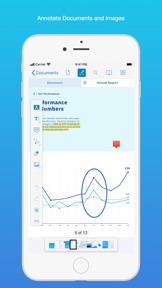
• Annotate images (JPEG, PNG) non-destructive, just like PDF documents. (PRO)
ANNOTATE WITH EASE
• While reviewing a document, use your finger or Apple Pencil to highlight and markup text.
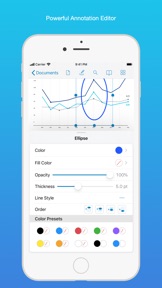
• Leave comments by adding a note, text or drawing directly on the PDF.
• Add images or audio.
• Reply to notes. (PRO)
SIGN DOCUMENTS ANYWHERE
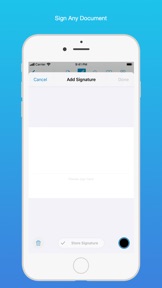
• Add your signature to any document using your finger or Apple Pencil.
• Move and resize your signature as needed.
• Flatten a document to ensure the signature doesn’t change.
CREATE AND EDIT PDFs
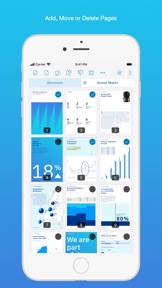
• Create new documents from existing documents by moving, rotating, deleting or adding new pages.
• Combine multiple documents into a single one. (PRO)
• Add bookmarks to easily return to certain pages in large documents.
FILL OUT FORMS
• Quickly fill out PDF Forms by adding text to the fields.
• Flatten and secure the form once you’re done to ensure the document doesn’t change.
• Add a signature to any Form.
STORE, ORGANISE AND SHARE
• Store documents, create folders and organise your documents.
• Share documents by printing, emailing or saving your edits back any cloud service.
PASSWORD PROTECT DOCUMENTS
• Read document metadata, title and keywords.
• Protect documents with user and owner passwords and limit permissions. (PRO)
AND SO MUCH MORE
• Conveniently switch to night mode when viewing your documents at night.
• Present on external screens without the distraction of toolbars. (PRO)
• Have the text from a PDF read out loud to you with text-to-speech.
• PDF Viewer remembers where you were down to the page/position where you left off - even across devices.
PRICING
PDF Viewer comes with a large feature set, completely free. Some advanced features require the purchase of PDF Viewer Pro, available as a subscription. We offer 3-monthly and yearly subscription plans. There’s also a fully functional 7-day trial, so you can test PDF Viewer Pro (including document merging and password editing) before you commit. All plans unlock the app on iPhone and iPad.
TRUSTED BY COMPANIES YOU KNOW
PDF Viewer is built on top of and powered by PSPDFKit, the same PDF engine trusted around the world by companies like Dropbox, Box, IBM, Atlassian, SAP and Lufthansa.
BE PART OF THE PDF VIEWER COMMUNITY
pdfviewer.io
twitter.com/pdfviewerapp
LEGAL
Duration and price of each subscription are displayed in PDF Viewers’ storefront, updated at the time of purchase. Payment will be charged to iTunes account at confirmation of purchase. Subscriptions automatically renew unless auto-renew is turned off no later than 24 hours before the end of the current period. Subscriptions and auto-renewal can be managed/turned off in the iTunes account settings. Any unused portion of a free trial period is forfeited as soon as a subscription is purchased.
Terms of Use: https://pdfviewer.io/terms
Privacy Policy: https://pdfviewer.io/privacy

Hva er nytt i denne versjon? (6.5.4)

Minor improvements and fixes.
Here’s the full list of changes:
• Improves contrast of text in the bookmark list in dark mode.
• Fixes a rare issue where documents may become invalid after editing.
• Fixes a rare crash when opening documents.
We’d love to hear your feedback! If you have ideas or feature requests for future versions of the app, feel free to let us know. You can contact us using the in-app Support button on the settings screen.
If you enjoy the app, please write us a review and help spread the word! Thanks!

Selger

Navn

PSPDFKit GmbH

Informasjon

Kategorier

Versjon

6.5.4

Størrelse

80,1 MB

Game Center

Nei

VPP Device Licensing

Ja

Vurdering

Aldersgrense: 4+

Kompatibilitet

iOS 15.0 eller senere

Enheter

iPhone 5s, iPhone 6, iPhone 6 Plus, iPhone 6s, iPhone 6s Plus, iPhone SE, iPhone 7, iPhone 7 Plus, iPhone 8, iPhone 8 Plus, iPhone X, iPhone XR, iPhone XS, iPhone XS Max, iPhone 11, iPhone 11 Pro, iPhone 11 Pro Max, iPhone SE (2. generasjon), iPhone 12, iPhone 12 Pro, iPhone 12 Pro Max, iPhone 12 mini, iPhone 13, iPhone 13 Pro, iPhone 13 Pro Max, iPhone 13 mini, iPhone SE (3. generasjon), iPhone 14, iPhone 14 Plus, iPhone 14 Pro, iPhone 14 Pro Max, iPhone 15, iPhone 15 Plus, iPhone 15 Pro, iPhone 15 Pro Max, iPad (femte generasjon) Wi-Fi, iPad (femte generasjon) Wi-Fi + Cellular, iPad (6. generasjon) Wi-Fi, iPad (6. generasjon) Wi-Fi + Cellular, iPad Pro, iPad Pro (Cellular), iPad Pro (9,7-tommers), iPad Pro (9,7-tommers) (Cellular), 12,9-tommers iPad Pro (2. generasjon), 12,9-tommers iPad Pro (2. generasjon) Wi-Fi + Cellular, iPad Pro (10,5-tommer), iPad Pro (10,5-tommer) Wi-Fi + Cellular, iPad Pro (11-tommer), iPad Pro (11-tommer) Wi-Fi + Cellular, 12,9-tommers iPad Pro (3. generasjon), 12,9-tommers iPad Pro (3. generasjon) Wi-Fi + Cellular, iPad Air, iPad Air (Cellular), iPad Air 2, iPad Air 2 (Cellular), iPad Air (tredje generasjon), iPad Air (tredje generasjon) Wi-Fi + Cellular, iPad mini Retina, iPad mini Retina (Cellular), iPad mini 3, iPad mini 3 (Cellular), iPad mini 4, iPad mini 4 (Cellular), iPad mini (femte generasjon), iPad mini (femte generasjon) Wi-Fi + Cellular, iPad (7. generasjon) Wi-Fi + Cellular, iPad Pro (11-tommers, 2. generasjon), iPad Pro (11-tommers, 2. generasjon) Wi-Fi + Cellular, iPad Pro (12,9-tommers, 4. generasjon), iPad Pro (12,9-tommers, 4. generasjon) Wi-Fi + Cellular, iPad Air (fjerde generasjon) (Wi-Fi), iPad Air (fjerde generasjon) (Wi-Fi + Cellular), iPad (8. generasjon) Wi-Fi, iPad (8. generasjon) Wi-Fi + Cellular, iPad Pro (11-tommers, 3. generasjon), iPad Pro (11-tommers, 3. generasjon) Wi-Fi + Cellular, iPad Pro (12,9-tommers, femte generasjon), iPad Pro (12,9-tommers, femte generasjon) Wi-Fi + Cellular, iPad (9. generasjon), iPad (9. generasjon) Wi-Fi + Cellular, iPad mini (6. generasjon), iPad mini (6. generasjon) Wi-Fi + Cellular, iPad Air (5. generasjon), iPad Air (5. generasjon) Wi-Fi + Cellular, iPad Pro (11-tommers, 4. generasjon), iPad Pro (11-tommers, 4. generasjon) Wi-Fi + Cellular, 12,9-tommers iPad Pro (6. generasjon), 12,9-tommers iPad Pro (6. generasjon) Wi-Fi + Cellular, iPad (10. generasjon), iPad (10. generasjon) Wi-Fi + Cellular, iPod touch (sjette generasjon), iPod touch (7. generasjon), Mac Desktop

Språk

norsk bokmål, arabisk, dansk, engelsk, finsk, fransk, gresk, hebraisk, indonesisk, italiensk, japansk, kinesisk, koreansk, kroatisk, malayisk, nederlandsk, polsk, portugisisk, russisk, slovakisk, spansk, svensk, thai, tsjekkisk, tyrkisk, tysk, ukrainsk

App Store: Poeng

Vurderinger og omtaler

4,5 av 5 (68 Vurderinger)

App Store: Omtaler

2021-01-05

Awesome... when it works

I’ve had the payed version of this app for a while now, and it’s been my favourite way to annotate pdfs... But crashes occurs quite frequently, and a simple restart of the app does re-open the app. Instead when restarting the app, it will show a white page for a few seconds and crash again. The only solution is to wait a few minutes, and then try again.
Isaac92a
Versjon 5.1.1
2020-04-01

Always draw with Apple Pencil?

Great app, but I wish I could set the Apple Pencil to always draw. That way I could open a document and just start taking notes, without pressing the markup button first...
Alexluthi
Versjon 4.2.1
2020-02-22

The best PDF productivity iPadOS app

Unequivocally the best app for reading, highlighting, and annotating PDFs directly on the iPad, whether locally or on the cloud, fully featured and compatible with other PDF readers like MacOS’s native preview. Other apps require copying files from your cloud to the app, resulting in multiple versions of the file and a lot of hassle. PDF Previewer works directly on the files in the cloud, so any annotations are synced immediately to the one version of the file.
After trying a ton of apps for PDF productivity, this is the clear favourite. Pity the Pro version is a subscription service rather than a one time purchase. That seems entirely contrived and unnecessary.
Moliat1
Versjon 4.2.1
2019-08-12

Cannot open any PDFs via OneDrive

I can’t open any PDFs while accessing my OneDrive. No matter if it was pre-edited or not. It says the file is either a non-PDF or corrupt file. Any help with that?
ppomorsky
Versjon 3.6.1
2018-11-21

App crashes

App functionality is great, but now the app crashes directly on start. Either due to upgrading to pro or due to one of the latest updates published.
Oddity134
Versjon 3.1.5