Oppdaterer

Restroom information map
Utgivelsesdato: 2015-12-14
Copyright © farbeyond llc All Rights Reserved.


iPhone Screenshots




iPad Screenshots


Beskrivelse
In steep OPP, or no experience of a cold sweat?
Time, do not know visit to Nandoki, OPP
The absolute necessary to when the "toilet"
OPP Nevertheless, the location of the "toilet" do not know, but want to go right now! !
Who even once and 2 but it is that there is experience.
For such OPP's, where to find the toilet?
In conjunction with the Google map as quickly searchable, the "toilet" that can be used in the event of an emergency nationwide
Easy, it is a map-type navigation app immediately searchable.
It is the concept of the app that the information shared by users like each other.
Let share information and immediately registered if there is a place where I think this
People to be saved You should have surely.
[Emergency toilet search and WC pin function]
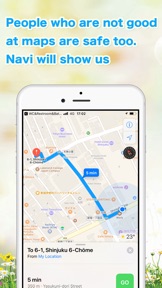
◎ GPS navigation!
Using the GPS function of Google Maps, or check the toilet of the location,
You can examine the route to there.
Also-or-! Because they firmly mounted also navigation feature is the voice guidance at the touch of a button!
And staring and looking for a corner Toka screen ... you do not need is!
◎ detailed amount of information! !
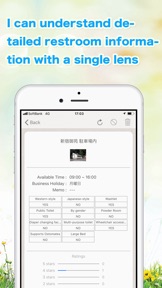
When you tap the "WC pin" that Sasa' on the MAP, you can check the specified toilet information.
Information is colorful! Washlet, multi-function toilet ostomate Powder Room, diaper changing tables ...
◎ add and share of the navigation information! Communication of the encounter of fit assistant to replace the map and purpose
Tap the "position" mark, move the cursor to the toilet location,
When you tap the Enter button, enter the information of the new "toilet",
And new you can give birth to "toilet pin".
I do not know anyone of any help, stand in someone else's role.
Would not it be wonderful encounter I welfare contribution of communication that holds in the mutual aid?
◎ map information is good, if the map only what you need! !
When you tap the "magnifying glass" mark, you can narrow down to the restroom necessary to put a check in the toilet of the item you want to use!
The doubt that information is the more the better. It's a useless there is no convenience that can be taken out when needed the information you need.
That's why I'm a map app to be selected.
【About advertisement hiding option】
In order to hide ads, you need to register for "Ad Hide Options".
【Ads Hide Option Price and Period】
※ The price may be changed.
※ Period is automatically updated from the date of application and one month.
【Billing method】
It will be charged to your iTunes account and will be updated monthly.
【Details of Automatic Update】
・ The subscription period will be renewed automatically for one month unless you cancel the subscription of the advertisement non-display option by 24 hours before the end of the subscription period.
・ The renewal fee for subscription period (one month) will be settled and charged within 24 hours from the end of subscription period.
・ Please note that if you subscribe to the ad hide option for a fee from the AppStore screen during the ad hide option free trial period, the free trial period will end at that point and payment will occur.
[How to cancel registration status confirmation / automatic update]
1. Open the "Settings" app
2. Select "iTunes & App Store"
3. Select "Apple ID: Email Address" displayed at the top of the screen
4. Tap "Display Apple ID" in the displayed pop-up.
5. Sign in as needed
6. Select the "Manage" button under the item marked "Registration"
The monthly member app currently registered is displayed. You can cancel the ad hide option from here. Please note that you can not cancel the ad hide option from within the app.
【Cancellation for the current month】
We do not accept cancellations for the ad hide option for the current month.
privacy policy
https://far-beyond.biz/maps_privacy_policy
terms of service
https://far-beyond.biz/maps_ios_tos
Hva er nytt i denne versjon? (1.36)
Fixed the in-app screen
Selger
Navn
farbeyond llc
Informasjon
Utvikler
Kategorier
Versjon
1.36
Størrelse
53,1 MB
Game Center
Nei
VPP Device Licensing
Ja
Vurdering
Aldersgrense: 4+
Kompatibilitet
iOS 13.0 eller senere
Enheter
iPhone 5s, iPhone 6, iPhone 6 Plus, iPhone 6s, iPhone 6s Plus, iPhone SE, iPhone 7, iPhone 7 Plus, iPhone 8, iPhone 8 Plus, iPhone X, iPhone XR, iPhone XS, iPhone XS Max, iPhone 11, iPhone 11 Pro, iPhone 11 Pro Max, iPhone SE (2. generasjon), iPhone 12, iPhone 12 Pro, iPhone 12 Pro Max, iPhone 12 mini, iPhone 13, iPhone 13 Pro, iPhone 13 Pro Max, iPhone 13 mini, iPhone SE (3. generasjon), iPhone 14, iPhone 14 Plus, iPhone 14 Pro, iPhone 14 Pro Max, iPhone 15, iPhone 15 Plus, iPhone 15 Pro, iPhone 15 Pro Max, iPad (femte generasjon) Wi-Fi, iPad (femte generasjon) Wi-Fi + Cellular, iPad (6. generasjon) Wi-Fi, iPad (6. generasjon) Wi-Fi + Cellular, iPad Pro, iPad Pro (Cellular), iPad Pro (9,7-tommers), iPad Pro (9,7-tommers) (Cellular), 12,9-tommers iPad Pro (2. generasjon), 12,9-tommers iPad Pro (2. generasjon) Wi-Fi + Cellular, iPad Pro (10,5-tommer), iPad Pro (10,5-tommer) Wi-Fi + Cellular, iPad Pro (11-tommer), iPad Pro (11-tommer) Wi-Fi + Cellular, 12,9-tommers iPad Pro (3. generasjon), 12,9-tommers iPad Pro (3. generasjon) Wi-Fi + Cellular, iPad Air, iPad Air (Cellular), iPad Air 2, iPad Air 2 (Cellular), iPad Air (tredje generasjon), iPad Air (tredje generasjon) Wi-Fi + Cellular, iPad mini Retina, iPad mini Retina (Cellular), iPad mini 3, iPad mini 3 (Cellular), iPad mini 4, iPad mini 4 (Cellular), iPad mini (femte generasjon), iPad mini (femte generasjon) Wi-Fi + Cellular, iPad (7. generasjon) Wi-Fi + Cellular, iPad Pro (11-tommers, 2. generasjon), iPad Pro (11-tommers, 2. generasjon) Wi-Fi + Cellular, iPad Pro (12,9-tommers, 4. generasjon), iPad Pro (12,9-tommers, 4. generasjon) Wi-Fi + Cellular, iPad Air (fjerde generasjon) (Wi-Fi), iPad Air (fjerde generasjon) (Wi-Fi + Cellular), iPad (8. generasjon) Wi-Fi, iPad (8. generasjon) Wi-Fi + Cellular, iPad Pro (11-tommers, 3. generasjon), iPad Pro (11-tommers, 3. generasjon) Wi-Fi + Cellular, iPad Pro (12,9-tommers, femte generasjon), iPad Pro (12,9-tommers, femte generasjon) Wi-Fi + Cellular, iPad (9. generasjon), iPad (9. generasjon) Wi-Fi + Cellular, iPad mini (6. generasjon), iPad mini (6. generasjon) Wi-Fi + Cellular, iPad Air (5. generasjon), iPad Air (5. generasjon) Wi-Fi + Cellular, iPad Pro (11-tommers, 4. generasjon), iPad Pro (11-tommers, 4. generasjon) Wi-Fi + Cellular, 12,9-tommers iPad Pro (6. generasjon), 12,9-tommers iPad Pro (6. generasjon) Wi-Fi + Cellular, iPad (10. generasjon), iPad (10. generasjon) Wi-Fi + Cellular, iPod touch (sjette generasjon), iPod touch (7. generasjon), Apple Watch Series 4
Språk
engelsk, japansk, kinesisk
App Store: Poeng
Vurderinger og omtaler
3,0 av 5 (1 Vurdering)
App Store: Omtaler
Ingen oppføring